




Your business mobile is more than just a device; it’s the key to your business whilst on the road. It’s basically a laptop in your pocket that can take calls, plan your next meeting, talk to customers and have access to your emails. Getting your mobile strategy right is essential these days. Miss the mark and you could be out of pocket, paying too much and being inefficient – which nobody likes.
This guide is purposefully built to help you navigate the world of business mobiles including the ‘need-to-knows’, how to setup your mobile, exploring the market for offers and keeping track of your arsenal. Whether you’re a small business with just one mobile, or you’re a medium to large business that has many, we should be able to give you a hand and take some of that load off. Let’s get started. Want to skip to a particular section? Use the handy navigation below.
Navigation
- Why get a business mobile?
- Samsung vs Apple: Which is better for business?
- The difference between network providers
- Best apps for your business mobiles
- How to upgrade your business mobiles
- SIM-only or handset: Which is better for business?
- How a poor business mobile plan can affect your business
- Top 5 business mobile myths
Why get a business mobile?
You may be wondering if a dedicated business mobile strategy is really necessary – don’t worry, we’ve heard it before. Working in the industry, we’ve helped a lot of businesses from various markets get on track to streamline their business mobiles. While using a personal mobile might be your current way of doing things, we’d like to suggest for you to consider otherwise. It’s worth getting a business mobile – we promise. It’s more than just making calls, it’s about creating a secure, professional and efficient system for you and your whole team. The benefits outweigh giving out your personal phone number.
Streamlining communications
A dedicated business mobile plan brings you and your team’s communications under one roof. Instead of juggling personal phone numbers and work contact information, everyone has a clear and professional line of communication. It’s not just easier for keeping track of your employees but when a client needs to be contacted, or has asked for a point of contact, it can be handed out with ease, centralising the whole system to business-managed numbers, taking out the headaches and keeps it all in one trackable place.
Looking professional
First impressions count. If you’re using your own mobile and mobile number, the merge of personal calls and business calls may get a bit cloudy. Whether it’s an existing customer or new, ringing in, you’re going to want to give them the professional ‘hello’ rather than the one you give your friends on a weekend. Having a business mobile for yourself and your team allows for consistency, credibility and it shows you’re an established business which takes communications seriously.
Improved efficiency
Business mobiles are tools for getting work done more efficiently. Setting up your mobile in the right way, with the correct apps, you can work from anywhere without any form of interruption. This is especially key when you’ve got an optimal SIM and data setup to boot. We’ll come on to that further down the article. The flexibility that a business mobile gives you isn’t comparable to the office-bound way of working as it can allow for travel and working remotely without requiring a full desk-phone setup.
Cost management
Nobody likes having to deal with expense claims. This could be the case if your team are using their personal mobiles – they’ll want the calls and data back that they used for business use. A business mobile’s sole purpose is to be owned and set up by the business. You can choose the handset you want, the data plan you want and the bolt-on packages you want when setting up new devices with a network provider. The predictability of setting up new devices makes planning your financials a lot easier.

Samsung vs Apple: Which is better for business?
The big debate of the 21st century: what’s better – Samsung or Apple? Samsung and Apple both have mobiles which are well-suited for being used in business, it more depends on an individual’s preference. Think to yourself: what have you used before and would you consider switching? They both have powerful features that they bring to the table so let’s break it down.
Performance comparison
When you look under the bonnet, both Samsung and Apple pack a serious punch in terms of performance. It really depends on what you’re looking for in your mobile of choice.
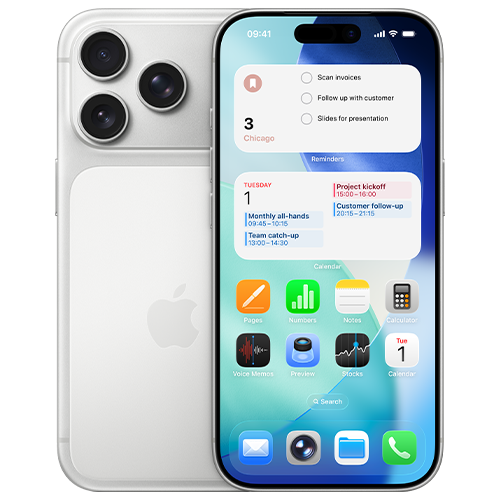
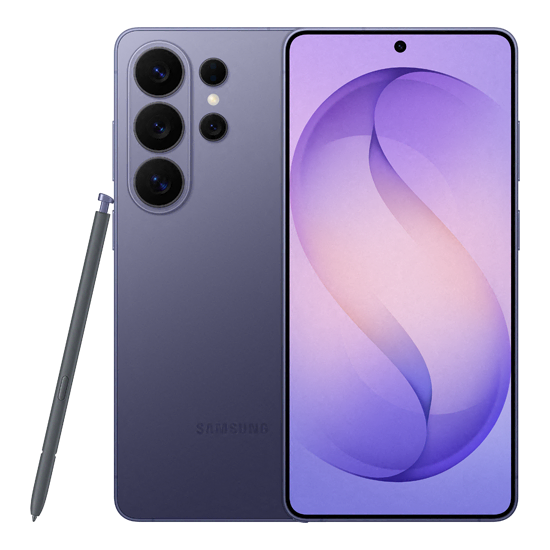
- Samsung – The Samsung devices on offer have impressive processing power, either with their top-of-the-line offering named the ‘Snapdragon’ or their in-house processors named ‘Exynos’. Outside of the tech talk, they’re basically really quick and can handle more or less anything you can throw at them. Samsung also tends to offer more RAM which also contributes to the overall speed of the mobile. This is especially important if you’re wanting to carry out a larger-than-normal amount of multitasking.
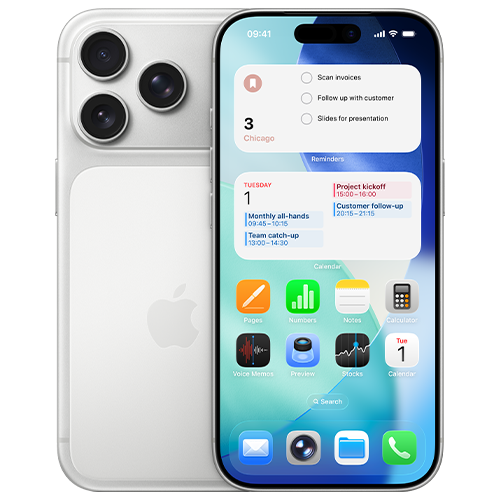
- Apple – The more recent Apple line up features their top-of-the-range A-series chips, designed in-house by Apple. This allows for seamless integration between their hardware and their iOS software, resulting in a super-smooth and responsive user experience.
In short, they both offer an impressive level of tech. Let’s have a look at their compatibility next.
Hardware and software compatibility
Compatibility can be some people’s major decider when thinking about their next business mobile.
Samsung, as it runs on Google’s Android operating system, offers more of an open ecosystem when it comes to day-to-day operations. This allows for a higher level of control and flexibility when connecting to Google workspaces and other third-party apps. It’s especially important if you rely heavily on those apps.
Apple is a bit more ‘locked down’ in comparison. More of a closed system. This means their hardware and software are tightly controlled by Apple themselves and can’t be customised in many ways. It does however mean it’s trustworthy, reliable and creates a friendly user experience across other Apple products. If your business already runs on Apple primarily, it’ll be a no brainer to go down the Apple route again. We find this when speaking to our customers – they typically prefer to stick to what they know. Just a little bit of insight for you.
Security features
Samsung has put lots of time and effort into its Knox platform. This is what is in place to protect your business mobile and the content within it. Designed to work quietly in the background, Knox is there to be a barrier to those threats you don’t want to have to deal with because we all know how annoying they can be when they show their face. The way Samsung has designed their security also means it’s easier to control what you need, going back to their open ecosystem. IT teams can fully protect and monitor mobiles with more ease.
Which brings us on to Apple. You’d think having a closed ecosystem would mean you’re not able to see and protect your business mobiles how you want but in fact, a lot of the work is done for you. Apple have built their platform to be trustworthy and protected right from when you set it to downloading various apps from their app store. The closed nature, combined with Face ID and Touch ID, protects your device right out of the box.
Value for money
Which option gives you more bang for your buck, you might be asking? Now, with the options available to you and depending on if you’re looking for a top-of-the-line model or a cost-effective option, it’s completely up to you with how much you want to spend. Both Samsung and Apple produce attractive lineups which allows for buyers to choose how much they want to spend based on the features they require.
Samsung offers a wide range of devices at various price points, from premium models to budget-friendly. This gives you full freedom to spend what you want.
Apple typically has higher price-point mobiles, but they do hold their value for an exceptional amount of time. This resale value and their overall longevity can mean you have a decent value mobile to trade in when it’s upgrade time.
The difference between network providers
Deciding on the handset you want is just one piece to the puzzle. The next and arguably more important piece is choosing a network provider as it decides how you’ll actually operate. From an aerial view, it might seem like all networks offer basically the same, however, that’s not the case and you’ll find that out quite quickly when having a look for yourself. Saying that, you’re probably wondering what you should be looking out for when browsing networks?
Coverage and reliability
Think of network coverage as the foundation of your business mobile plan. What happens when your team can’t get a stable connection? You’ll find out quite quickly, that’s for sure. There will likely be troubled employees and annoyed customers as far as the eye can see. We hate to say it but that’ll transfer into loss of revenue if that’s the case and nobody wants a problem like that!
Luckily, different network providers have varying strengths around the country. Some might be better than others where you are. It’s always worth checking before you start seriously looking as it could quickly cut some off your list if they’re not too reliable in your area. Luckily, Ofcom have a mobile signal checker which you can find on their website.
Data speeds
Nobody would want slow data speeds. As of recent, many providers have taken to offering 4G and 5G as standard. Network providers have even been working on turning off 3G as it didn’t offer much in the way of speed or reliability. You’ll find when exploring the market, 4G and 5G is the new standard so signing up to one of those data plans will give you the best chance of staying online no matter where you are.
Different available plans
We won’t hold you to knowing what you fully want from your business mobile plan, but we’ll help you figure it out. Network providers offer an overwhelmingly large number of business mobile plans in the form of handsets and SIM-only offers. It’s completely up to you what you choose. It’s fair to say, they’re not always built the same, especially when comparing a personal plan to a business plan. Business-specific tariffs often come with more perks such as data sharing across devices, international roaming, device insurance and sometimes dedicated account management, which is usually reserved for the larger accounts.
Plan expansion and other additional costs
All business owners hope for expansion and the last thing you’d want to worry about is not having enough business mobiles or SIM-only plans when that time comes. As you hire new members, you’ll need your plan to grow with you. It’s worth looking for a network provider that can assist with your expansion and can offer benefits such as flexible plans, clear pricing structures, caps on out-of-bundle spending.
Best apps for your business mobiles
Clogging up your home screen on your phone is one of the most annoying things to sort out. Have you ever stopped to think which apps are required and which you can safely delete? Choosing the right apps can completely transform your way of working and streamline the workload, especially if you’re matching the apps used with your team – seamless transfers and daily operations without the hassle.
Cost comparison
Some apps are free (those are our favourites) and some are paid for which have subscriptions ticking away in the background. It’s incredibly easy to lose track of monthly app costs. When selecting apps which you’ll use on your business mobile, it’s recommended to really put some thought into their cost and whether there’s a way to consolidate multiple apps to save on subscription costs.
- Licensing: Do you need to get an expensive enterprise plan, or will a basic plan do the job? Only get what you need.
- Consolidation: Do you need multiple apps to do the same job? Find an app which can do it all in one.
No matter your outcome, make sure to take note of the subscription outgoings and review them every once in a while, to ensure they’re still needed. If not, it’s worth looking at cancelling them.
Flexibility
Flexibility is key. This is the case with the apps you use too. Does your current app lineup let your team work smoothly from anywhere; on a train, in a coffee shop or whilst they’re at home? By choosing reliable, cloud-based applications, you and your team can access whatever they need with ease and experience no interruptions. It makes collaborations much easier.
Scalability
As we’ve touched on before, businesses scale and the technology used needs to scale at the same pace. The apps that you use, it’s worth noting whether you can upgrade the access to them smoothly. Just a few clicks would be ideal. There are also apps which allow you to change your access on the fly, meaning when your requirements increase, you can pop into the app and upgrade your plan at the touch of a button. We recommend thinking of these things now so it cuts out the headache you could face down the line.
How to upgrade your business mobiles
It might feel like a complicated or long-winded task to switch your mobile provider and upgrade your business mobiles, maybe even a bit overwhelming, but we’re here to handle that stress for you. It doesn’t have to give you a headache. With some strategic planning, and some assistance from us, you can easily transition your team to newer mobiles or improved data plans without any additional stress.
Why upgrade?
Are your current business mobiles struggling with holding charge or perhaps they’re feeling quite slow. It happens. Old tech can be frustrating, as we all know. When that happens, it’s probably the best time to start upgrading your hardware. By upgrading your tech, it provides the best chance for yourself and your team to maximise efficiency and not have to pointlessly worry whether the mobile can keep up. The secondary benefit of a new mobile can also mean sharper cameras, longer battery life and important security improvements such as touch ID or face ID.
Timing of the upgrade
The timing of the upgrade can be just as important as the upgrade itself as if you don’t time it correctly, you may face some issues. So, when is best to make the switch to a newer piece if kit?
- End of contract: Keep an eye on when your contract comes to a close as you could be up for an upgrade anyway.
- End of financial year: If you’re nearing the end of your financial year, you may have some additional budget to use before it’s too late.
Device performance issues: If there’s constant talk of slow mobiles or hardware issues, it’s worth getting that sorted ASAP.
Choosing the right plan
There may seem like a massive number of plans which you could go for but it’s always worth evaluating your current usage to make sure you don’t get unnecessary data as that’ll waste money. It’s all about choosing the right plan to match your use. If your team work remotely and uses cloud apps, you’ll have to make sure you cater for their data needs. Office staff won’t need nearly as much as they can rely more on Wi-Fi so you can save some pennies on small packages. Different network providers offer different plans at different price points so browse around. It’s the best way to find a good deal.
Data transfer and setups
That last thing you’d want is to juggle the move of contacts, emails and other important files to another handset. Luckily, mobile manufacturers have made it much easier to do so, without the stress. Cloud backups mean you’re able to sign in to another mobile and restore a backup. It also gives you a chance to have a start fresh with your apps. Only download what you need when you need it as it’ll give you the best chance to keep your mobile in tip-top shape for longer as it’ll have more storage and generally less to deal with on start-up.
SIM-Only or handset: Which is better for business?
So, you’re ready for a new business mobile plan but which direction do you take? Do you go down the route of going for a shiny new handset or do you opt for SIM-only? Going for the first option, a full handset ‘all-in’ option, can feel like the easiest but is it what you really need? Could going for a SIM-only option could be the answer to your prayers? Let’s have a look in a bit more detail.
Cost comparison
To put is as simply as we possibly can, a handset contract is going to set you back more and sign you up for, typically, a longer amount of time. That’s the obvious bit. It’s basically signing up to pay off the mobile as well as a SIM to go with it. It’s not to say network providers don’t throw out some good deals though, meaning it’s not too impactful on your outgoings each month. The second obvious point is a SIM-only contract is going to be cheaper. You’re paying for the minutes, texts and data each month on either a rolling basis or a fixed-term contract. This again depends on what you sign up for. Explore your options before making your decision.
Flexibility
Signing up to a handset means you’ve signed up to a longer period of time which you will need to honour. It’s not that much of an issue, with newer devices especially, as the handset lifespan will far outstretch the term you’ve agreed to. Leaning more on flexibility, a SIM-only option may be better for you but you’re going to need a handset to start with. It could be a second hand and cheaper mobile or just an existing mobile you’ve got already, either is fine as long as you’re happy.
Device ownership
If you’re new to the business mobile game, you might not be fully educated yet, but we’ll give you a hand. With a business mobile contract, the provider technically owns the device until you’ve paid off your contract. If you’ve gone for a SIM-only contract, you’re good to go and you don’t have to worry about device ownership. That phone is yours and always will be.
Scalability
Having your business scale is a blessing. We’re incredibly proud that you’re considering the need to look into scaling your business but there is also the admin side which may get some yawns and eyerolls but, it’s not all bad. It’s much easier to upscale a SIM-only contract and add more to your plan, as long as you’ve looked into this with your provider. If you’re yet to sign up to anyone, there’s our tip of the day – check you’re able to make amends with your contract. Upscaling when having handset contracts are possible but it’ll take a bit more work. The network provider you choose can give you a hand with the details.
How a poor business mobile plan can affect your business
Signing up to a business mobile plan, handset or SIM-only, can sound like an easy task but if you get it wrong, it could give you the biggest of headaches. Bigger than any headaches we’ve mentioned before. Let’s take a look at how it can affect you if issues arise from your business mobile contract.
Skyrocketing costs
Without you knowing, a wrong plan can eat right into your profits. Sounds horrible, doesn’t it? A poorly structured mobile plan can produce some problems in terms of skyrocketing costs. Out-of-bundle plans and spending due to going over your data allowance can add up just as quickly as saying, “get me a new business mobile plan!”.
Roaming charges when travelling are also one to keep an eye on. Steep penalties can show their face when you least expect it so be careful and keep an eye on your monthly bills if you’re travelling.
A lack of flexibility
We hope just as much as you that your business expands, meaning you’ll be hiring more people and will also likely need more business mobiles for those staff. If the plan you setup is quite rigid, you’re looking at either spending lots or having issues with efficiency due to specific staff not being able to have their own mobile. When signing up to a business mobile plan, ensure flexibility and changes on the go are an option.
Roadblocks to expansion
Leading on from our flexibility point, it’s also worth checking out if the provider you’re looking to switch to has a good track record with other customers. Give Trustpilot and Google Reviews a quick scan to make sure they won’t cause roadblocks when you need changes made to your plan. If you’re experiencing any of the below, it may be worth evaluating who is looking after your mobile contracts.
- Long wait times for SIM cards to arrive and activate
- Slow pick up times when calling into customer service
- Inability to pool data across plan members
Lost productivity
Poor coverage and painfully slow data speeds do more than just annoy your staff; it’ll directly impact your business efficiency and start to impact customers in the worst of times. Nobody likes bad reviews, do they. If your team can’t rely on the hardware they’ve been given, productivity will be sure to take a hit. Joining client calls, video calls and accessing important documents through cloud services will be problematic which means you could quite easily lose out on future opportunities.
Top 5 business mobile myths
When it comes to setting up yourself and your team with business mobiles, there can be quite a few misconceptions about the subject. We wanted to help clear that up and let you know of the main myths we’ve heard about in the business mobile world.
1. Business mobiles are too expensive
Is the price of business mobile contracts the part that’s putting you off? It’s actually a common misconception that dedicated work phones will cost you an arm and a leg. In reality, relying on personal devices often leads to unpredictable expense claims. In the long run, you’ll save money through options such as predictable billing, shared data pools and tax benefits.
2. Personal phones are fine for business use
The line between personal and business phones can blur if you’re not careful. It might make sense on paper to have one phone to do it all, but it can look unprofessional and may cause problems. If you’re getting a call you’re not expecting and unsure what tone to answer it in, you may be saying goodbye to a possible client if you’re not careful. There are also the IT logistics from a legal and security perspective. Personal mobiles will be harder to regulate and monitor and since they’ll be carried around everywhere, confidential files, emails and messages are on the move 24/7.
3. All networks offer the same
Thinking all networks offer the same options may seem like a sound thought but there’s actually a lot of difference from one to the next. Different networks have different offers so it’s worth the time and money to explore all the options you have available. Data also reacts differently with each network provider so check the coverage.
4. Business mobiles don’t need additional security
Everyone with a smartphone uses the lock code feature to keep your private files, photos and all sorts of other content safe. You might think this would be enough, but you’ll want to look into further encryption software and setting up separate work profiles on the software you use. You’ll thank yourself if the worst were to happen. IT personnel and external IT companies can keep a closer eye on mobiles with additional software installed which will help if the mobile goes missing. For example, you lose your phone. Not sure what to do? Get IT to lock down the phone remotely and wipe anything which is too precious to leave on there.
5. Upgrading business mobiles is a hassle
Are you dreading needing to sort out your business mobiles which you currently have? From a bird’s eye view, it may seem like a mammoth of a task but it’s not that bad, we promise. Mobiles now have efficient cloud-based accounts (iCloud of Google Drives) meaning moving over data isn’t much of an issue anymore. Are you more worried about the logistics? That again isn’t much to worry about these days. Network providers can do most of the leg work for you so really, all you need to worry about is finding your next mobile or SIM-only plan, organising it with the network provider and backing up your existing mobiles.
Time to level up
Your business mobiles play a larger part in businesses than they may present so make sure you’re setup and ready to operate at an efficient level. By choosing the right handset, you can be a real powerhouse. Are you ready to level up your business mobiles? We can give you a hand. Get in touch today.