


Every year, new mobiles come out and it may make you wonder – “How popular are the new mobiles on the market?” With our knowledge and expertise in the world of business mobiles, at Aerial Direct, we’re able to give an in-depth sneak peek into what the top 5 business mobiles for 2025 are.

Whether you’re looking to upgrade your entire team or just need a reliable handset for yourself, we’ve done the heavy lifting by analysing the specs, the value and the durability to bring you our definitive list of the top 5 business mobiles of 2025. Being a mobile phone business, we have stacks of data to pull together, analyse and put on show, just for you. Take a look at our 2025 results.

The 2025 lineup at a glance

If you are in a rush and just need the headlines, here is the snapshot of our top picks for the year.

  • iPhone 16
  • Samsung Galaxy A16
  • iPhone 13
  • iPhone 15
  • iPhone 16e

A deep dive into the top 5 business mobiles

Now that you know what to look for, let’s break down why these specific handsets made the cut for 2025.
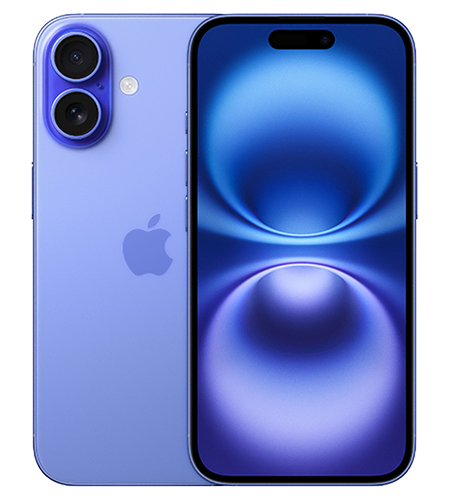
1. iPhone 16

If you’re not too worried about the price and you’re looking for high performance, the iPhone 16 is well worth consideration. Apple has been working hard to make their new A-series chip as tough and durable as possible. It’s especially impressive in the multi-tasking department.

If AI has taken your fancy, it’s especially developed to seamlessly integrate artificial intelligence into your daily life. It can help you write up notes, plan for your next meeting and provide instant knowledge at the touch of a button.

Plus, battery life is always an important area to note. The iPhone 16 lets you get through a whole day of being productive without having to carry around that pesky wall charger. There’s nothing worse than hunting for a plug when you’ve got a busy day ahead.
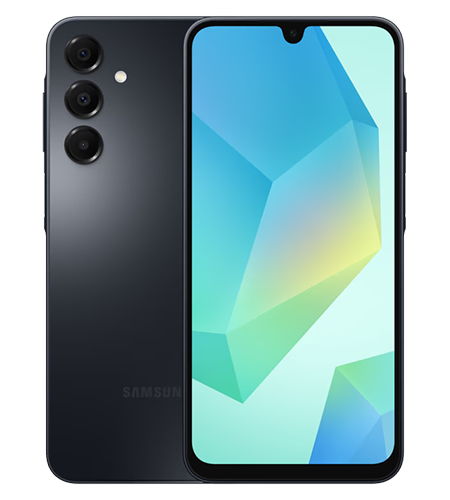
2. Samsung Galaxy A16

Not every employee needs a flagship device that costs a fortune. The Samsung Galaxy A16 is the hero of cost-effective team management. It proves you don’t need to spend thousands to get a capable business tool.

The A16 features a crisp display that makes reading documents easy on the eyes and the expandable storage is a massive bonus for those storing large files locally. Its battery life is legendary in the mid-range market. If you are equipping a sales team or field workers who need reliability without the bells and whistles, this is your best bet. We can safely say it’s a keen model among small to medium businesses.
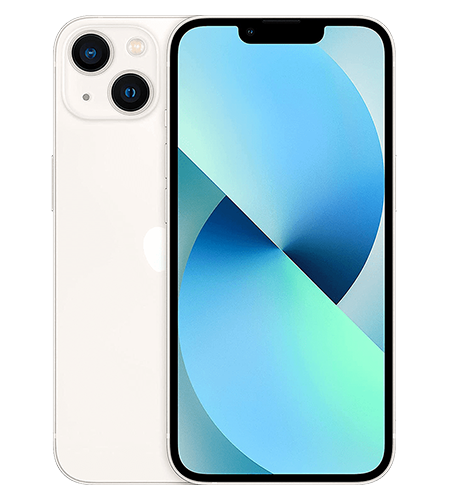
3. iPhone 13

No, this isn’t a mistake – the iPhone 13 is in fact one of our top-performing business mobiles for 2025! We’re not pulling your leg. You’d be surprised to know that it’s actually a top seller because of it being a trustworthy piece of kit that has a huge amount of potential still at play.

It can handle the latest updates with ease and with it being a bit older, it’s cheaper than some of the newer mobiles on the market. For most businesses, it sits right in the sweet spot. 5G connectivity, high-quality camera, decent battery life and still having a premium look – it’s a no-brainer! We’d recommend having it within your team if you’re looking to save on the cash.
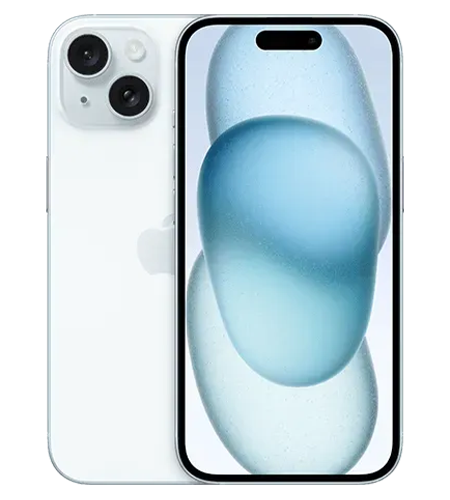
4. iPhone 15

Sitting somewhat comfortably within the pack is the iPhone 15. It features modern hardware and sensible pricing, which is what a lot of businesses are looking for. This handset even features one more benefit – the capability to be charged with the same charger as other newer Apple devices – this is the first iPhone that they changed to a USB-C charging port. One less wire in your bag is always a plus!
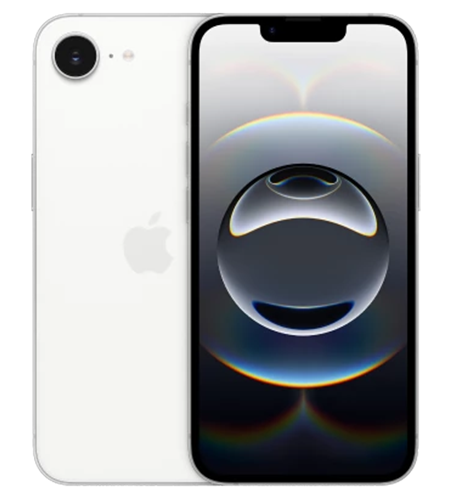
5. iPhone 16e

The iPhone 16e is Apple’s answer to businesses demanding the latest tech without the flagship price tag. It strips back the luxury materials (like titanium frames) but keeps the engine – the processor. It’s built for business.

You’ll also find it’ll have a decent lifespan within your business as it’ll support new updates and features for years to come.

How to choose the right business mobile

Before you make your final decision, it’s important to think about what your business really needs. Picking a phone for personal use is about what you want, but choosing one for business is about what you need. Check out the three key factors to consider before clicking ‘buy now’.

1. Operating System: iOS vs. Android

This is the oldest debate in tech. If your office runs on MacBooks and iPads, sticking with Apple (iOS) makes sense for the seamless file sharing via AirDrop and device management. However, if your business relies on Google Workspace or you need customisable file systems, Android (Samsung) offers flexibility that Apple simply doesn’t. It’s always worth checking with your IT team too – they might have a favourite so it’s worth checking which can they optimally support.

2. Battery Life and Charging

For a business mobile, a dead battery means lost revenue. Look for phones that offer “all-day battery life”. Also, consider charging speed. Can you get 50% charge in 30 minutes before running out the door? Sometimes, that last minute charge might be the difference between you booking in your next client or losing out because you can’t access your outlook calendar.

3. Longevity and Support

How long will your phone get security updates? Business data is sensitive. Apple typically supports phones for 5-6 years, while Samsung has recently matched this with impressively long support windows for their newer devices.

Comparison: Which one fits your team?

Obviously, the choice of business mobile is completely up to you. You’ll have to weigh up your options and your requirements before deciding. Now, you don’t have to go with one of our popular models, especially when new mobiles are being launched each year – we’re just here to give you some guidance and a helping hand.

  • Need longer battery life? Go for the iPhone 16.
  • Want to spend a little less? Galaxy A16 is your best bet.
  • Looking for a simple life? iPhone 15 with USB-C charger.
  • You want a long-term investment? iPhone 16e offers the best lifespan-to-cost ratio.

You don’t always need to go for the most expensive one. It’ll be the one which fits best into your workday, seamlessly allowing you to carry out your work needs.

Summary FAQs

The iPhone 16 and Samsung Galaxy A16 are the best mobiles for battery life. The iPhone 16 relies on power efficiency to hold its charge and the Galaxy A16 features a huge battery to keep it going for longer.

If you’re looking to get the best bang for your buck, the iPhone 13 is definitely the right choice. It can handle the most recent updates with ease and has good operational speed. If you’re looking for a longer-term investment, the iPhone 16e will clearly outshine the iPhone 13. It might cost more now, but over time, it’ll be a better return on investment.

Technically the two different brands can work, you’ll just have to base your files and calendars on a more central cloud-based option such as Google Drive and Google Calendar. You also won’t be able to use any brand-specific features, such as iMessage or AirDrop , as they’re Apple-only features.

The iPhone 15 now charges with a USB-C cable, just like most other devices today, so that means it’s one less cord to carry around!

5G is becoming the norm for business mobiles. Its  high download and upload speeds ensure for a quick experience and you’ll have less downtime, especially on those important calls. We’ve even put together a blog about 5G for business mobiles – check it out!

The benefits of 5G for business mobiles

If you’re looking for a change or you’d like to get in touch about anything else telecoms, get in touch with our expert team. We’ve hit the 18k reviews mark on Trustpilot and rated excellent – take a look for yourself.

The world is changing at a fast pace and businesses need to stay up to date; they especially need to be responsive and flexible and 5G connectivity can help if you’re not already plugged in. Business mobiles sit right at the heart of this, especially when you’re managing remote teams, juggling cloud-based tools, or keeping in touch with customers while on the move.

This is exactly where 5G business mobiles come into play. As the next big leap in mobile connectivity, 5G offers faster speeds, better reliability and far greater capacity. But what does all that tech-talk mean for your day-to-day operations?

Let’s jump into the key benefits of 5G for business mobiles and see how it can smooth out your working day.

Keeping up with the times

Speed is one of the biggest wins when it comes to 5G. We’re talking lightning-fast downloads, seamless uploads and video calls that actually feel like you’re in the same room.

You’d be surprised how often slow connection can affect your business. It can be a real pain at the worst time and that dreaded buffering wheel can give people nightmares. 5G speeds up your day and ensures you can get online quickly to carry out your normal tasks without interruptions. O2 have improved their infrastructure sevenfold to keep up with the times. Check out their latest news on their 5G standpoint.

Why is 5G better than 4G? How it works…

Let’s start with some key knowledge; so you know what we’re delving in to. The difference between 4G and 5G is huge, whether you know the technical reasons or not. In short, it’s a huge amount more efficient and incredibly speedy in comparison.

The development into 5G wasn’t a quick process as it took some tweaking and improving along the way before it was officially rolled out across the UK.

Here’s some beneficial know-how before we get cracking into further 5G benefits:

  • Targeted Signals: 5G stations aim directly at your device. It basically cuts down the randomness and specifically targets your mobile.
  • Efficient Packaging: Think of it like sending one well-packed parcel instead of lots of little envelopes; it’s simply more efficient.
  • Closer Connections: With more towers available, especially in busy areas, your data doesn’t have to travel as far.

Reliability you can count on

With so many businesses now mixing remote work with office days, your mobile is often your lifeline. Sales teams, engineers and managers need to know their connection won’t let them down.

Introducing 5G technology brings a host of stability improvements to your fingertips:

  • Enhanced network stability for fewer interruptions.
  • Reduced delays when transferring important data.
  • Fewer dropped calls during critical conversations.
  • Video conferencing that’s smooth and professional.
  • Real-time performance that keeps up with your apps.

For any business that relies on mobile connectivity to keep customers happy and operations running smoothly, this reliability is a real advantage.

Working smarter with cloud tools

Is your business moving everything to the cloud? Whether it’s email, storage, accounting, or team projects, 5G makes accessing these tools on your mobile faster and smoother than ever.

With a 5G-enabled business mobile, your team can collaborate on shared documents in real time, securely access business systems while travelling and finally cut the cord on searching for decent Wi-Fi.

Future-proof your business

You might be thinking, “Do I really need 5G right now?” While not every app demands it today, getting 5G-ready devices is a wise move for the future.

As software and apps continue to develop, they’re going to rely more on 5G capabilities. By upgrading now, you’re setting your business up for long-term growth. Plus, modern mobiles are built to last longer than you’d think. While the trend has seen people upgrade every year, a good device can serve you well for a long while, especially when it’s ready for new network speeds.

Conclusion

Choosing the right solution depends on where you are and what your business needs to succeed. While 5G coverage is spreading rapidly across the UK, it might not be a “must-have” for everyone straight away. However, for many, making the switch to 5G business mobiles offers immediate advantages and safeguards your communications for the future.

Thinking about shaking up your mobile set-up? It’s worth considering how 5G could support your team and keep your business connected as you grow. Check out our handsets too, especially if you’re looking for an upgrade. As one of O2’s largest partners, we know what we’re talking about.

Summary FAQs

5G offers faster speeds, improved reliability and greater capacity, helping businesses boost productivity and stay connected on the go.

5G delivers faster connections, more stable network performance and better support for real-time applications than 4G.

Yes, 5G brings enhanced stability, reduced delays and fewer dropped calls, making it ideal for essential business communication.

Absolutely! 5G ensures smoother, faster access to cloud apps, document sharing and mobile collaboration, wherever you are.

While not every business needs 5G right away, upgrading prepares you for future growth and new technologies as they arrive.

Technology is relied upon more than ever. It’s the same from home life to the working world, and a business mobile isn’t just for taking calls anymore; it’s for booking meetings, taking video calls and managing your entire work life.

A proper business mobile setup ensures your device is secure, fully functional, and optimised for the demands of your day-to-day. This blog will walk you through the setup of your new business mobile and ensure that your switch to a new device is as smooth as possible.

Navigation

Step 1: Finding the right business mobile plan for your needs

There are many business mobiles on the market which offer a variety of different features, so ensuring you’ve got the exact mobile for your requirements is key. Depending on the provider, some offer features such as:

  • Shared data for multiple handsets
  • Flexible contract terms
  • International roaming packages

Ensuring you’re covered whilst on the road

Check coverage maps from major providers like EE, O2, Vodafone and Three to ensure reliable service where you operate. Other providers such as BT Business and Gamma Mobile also offer strong business mobile packages so it’s worth exploring options.

If you work in rural areas or travel widely, prioritise networks with the strongest coverage in your key locations rather than just the cheapest plan.

Step 2: Unboxing and first checks

Once you’ve received your business mobile, you can then start the first checks and setup procedure.

  1. Unbox it carefully and check everything is included — handset, charger, SIM tool and manuals.
  2. Inspect for any visible damage before powering on.
  3. Give it a full charge before you start the setup process. This ensures your battery is working properly and you won’t get cut off halfway through downloading essential apps or transferring data.

If your provider has supplied a SIM:

  1. Turn off the phone.
  2. Open the sim tray with the provided SIM tool and insert the SIM.
  3. Turn back on and follow any prompts.

Some networks activate automatically; others require logging into an online portal or calling customer support. Before proceeding, it’s usually best to let the business mobile sit whilst it connects to your provider.

For eSIMs

For both Apple and Android, the steps are similar when activating an eSIM.

Apple

  1. Open settings and go to Mobile Data.
  2. Tap Add eSIM.
  3. Either use a QR Code or enter the details manually.
  4. Follow the on-screen instructions to activate with your provider.

Android

  1. Open settings and navigate to Network & Internet or Connections.
  2. Tap on Sims or SIM Manager.
  3. Download eSIM or Add Mobile Plan.
  4. Either use a QR Code or enter the activation code manually.
  5. Follow the on-screen instructions to activate with your provider.

Step 3: Transfer your contacts and data

For many businesses, contacts are the lifeblood of work communication which is why you’ll want to prioritise transferring them from your old phone. The typical process is through Cloud backups from your Apple ID or Google account but remember that it’s worth moving across everything from your old mobile so you’re as caught up as possible and can get moving on your day-to-day tasks. If it’s a new mobile, not to worry. Follow the standard steps which the mobile provides prompts for and start anew. Sometimes it’s nice to start fresh, even if you have an existing mobile. The choice is yours.

Step 4: Install your main work apps

Once the essentials are in place, load your device with the apps you use daily.

  • Email & calendar: Outlook, Gmail, or your company’s preferred client.
  • Collaboration: Microsoft Teams, Zoom, Slack.
  • File storage: OneDrive, Google Drive, Dropbox.
  • CRM systems: Salesforce, HubSpot, or industry-specific software.

Download only from official app stores to ensure you avoid security risks. Some of these are optional and, on some occasions, your workplace might already pre-install your new mobile with the apps needed to start work. For security reasons, some businesses also prefer to lock down the app download process, requiring an admin password to get anything new on your mobile so, if this is the case at your organisation, work with your IT team to get what you need.

Step 5: Configure email and calendar sync

Your email is often the first work tool you’ll need. Your communications to your customers and co-workers will be within this app. Typically, it’s easier to use the built-in email app which comes with your mobile, but sometimes you might want to download Gmail or Outlook– it’s your choice.

To get started, open the email app and follow the on-screen instructions to log in to your account and start syncing the data. Once complete, your existing emails should populate onto your device and new mail should start flowing through.

Step 6: Secure your device

Security isn’t optional for a business phone – it’s essential since that under UK data protection legislation, you have a legal duty to protect client and company data.

Must-do steps:

  • Set a strong passcode or biometric lock.
  • Turn on tracking tools like Find My iPhone or Find My Device.

For sensitive industries, two-factor authentication (2FA) on key apps is highly recommended.

* TIP: What to do if you lose your mobile *

If you were to lose your mobile and are unsure if you’ll get it back within a timely manner, it’s usually best to ensure its locked down so nobody can access it. As well as relying on the passcode or biometric lock, it’s recommended to let your provider know so they can deactivate your SIM so it can’t be used. Once that’s done, the suggestion would be to change passwords for software and accounts which are downloaded and logged in on that device. Tracking tools can then be used to find the device.

Step 7: Optimise for productivity

Once your essential apps are downloaded and you’re ready to start using your mobile daily, there are some optional efficiency changes which can be made to find apps quickly and increase the general speed of use for your business mobile.

  • Organise your home screen so work apps are on the first page.
  • Use widgets for quick access to calendars, task lists, or emails.
  • Enable voice assistants like Siri or Google Assistant for hands-free actions.
  • Setup folders to organise your apps, keeping similar apps together.

This is where your business mobile setup moves beyond the basics into making the phone genuinely work for you.

Step 8: Setup backup and storage

Cloud backups ensure that if your phone is lost, stolen, or damaged, you can be back up and running in hours, not days. The business mobile itself will usually come with the capabilities needed to carry this out itself. That way, it reduces confusion for the user. Some businesses might want to carry out their own backups and storage, but this is something to talk to your IT team about.

Step 9: Testing before you go live

Before relying on your mobile for work, there are some areas you might want to test and troubleshoot. Doing so will ensure when you’re on the road or with a client, the process is smooth and there are no unexpected hiccups. Testing these beforehand makes sure you’re ready to market your business, talk to clients and setup that next conference call smoothly and efficiently.

  • Make a test call.
  • Send a test email.
  • Check your internet connection in the places you work most often.
  • Open and edit a file from your cloud storage.

Are you looking for your next new business mobile?

We’re here to help! At Aerial Direct, we specialise in business mobiles for many different types of businesses. We help anyone from schools to large 100+ companies get the technology they need to run efficiently. Apple and Samsung are some of our most popular devices and our sales team can find the optional plan for you.

Get in touch with us today for more information.

A business mobile is no longer a nice-to-have. With over 88 million mobile connections in the UK, well over the population total, it’s clear phones are now part of how work gets done (DataReportal). Choosing one isn’t just about a device, it’s about setting your team up with the tools they need to work effectively, wherever they are. 

This article looks at how to approach buying a business mobile, what to think about, what to avoid, and how to make your investment count. Whether you’re running a solo operation or looking after a growing team, knowing what to consider will help you make a smarter decision. 

Picking the right phone and plan 

Not all devices or deals are the same. Start with the platform: iPhones and Androids dominate, with Apple holding around 48% of the UK market and Samsung close behind (StatCounter). Make sure whatever you choose fits the apps and systems you already use. 

Next, think about how much data your team will use. 5G is becoming more common, and phones that support it are great for things like video meetings or working on the move. 

Security matters too. Look for models with encryption, fingerprint access, and remote wipe functions. It’s worth picking a plan that includes fast support and lets you tweak terms as your team grows. Some providers let you pool data between users, handy if some team members use more than others. 

Comparison Table: Apple vs Samsung vs Other Android Devices 

Feature Apple (iPhone) Samsung (Galaxy Series) Other Android (e.g. Pixel, OnePlus) 
Operating System iOS Android (One UI) Android (Stock or Custom UI) 
App Ecosystem Controlled and consistent Broad and adaptable Varies by brand 
Device Management Apple Business Manager Knox Suite Depends on brand 
Security Face ID, Secure Enclave Biometric, Knox Suite Biometric, varies by device 
Integration with Mac/PC Strong with macOS Syncs well with Windows Varies 
Price Range £700–£1500+ £600–£1300+ £400–£1000+ 
Battery Life Long-lasting Varies Varies 
Durability High, with ceramic shield Strong, Gorilla Glass Moderate to strong 
Support & Updates Around 5 years 3–4 years 2–3 years 

This breakdown should help you line up your priorities with the device that fits best. 

Rolling out business mobiles the right way 

Buying phones is only half the story. How you hand them out and train your team matters just as much. Start small: test things with a few users to catch problems early. Make sure everyone understands how to use the tools you’re giving them. 

Link the phones into your systems, your messaging apps, finance software, customer databases. Done right, mobiles become a proper part of the job, not just another gadget. Set rules around what’s okay to install or share to avoid headaches later. 

Security policies should be clear from the start. Track usage, make sure updates are applied, and have a way to lock or wipe a phone if needed. With UK companies losing an average of £3.4 million to data breaches in 2023 alone (IBM), taking this seriously isn’t optional. 

Seeing the results from your investment

If you’re spending money on new phones and contracts, you’ll want to see what you’re getting back. Look for signs like lower phone bills, faster customer replies, or shorter time to close deals.

Staff with the right tools get more done. They can reply on the go, check systems while visiting clients, and move faster than if they’re tied to a desk. According to Radius, giving teams mobile tools can boost productivity by 20% (Radius).

Don’t ignore softer results either. When staff have reliable gear and clear boundaries between work and life, they tend to be happier. Clients notice when your team is organised and professional, it all adds up.

What’s next for business mobiles? 

Phones are already a big part of how companies work, and that trend isn’t slowing down. Unified communications systems, better 5G coverage, and eco-conscious hardware are all shaping what comes next. 

Most of us now use tools like Microsoft Teams from our phones. In fact, over 70% of Teams app users are mobile-first (TechRadar). That tells you where things are heading: more flexibility, more mobility. 

Sustainability is creeping up the list too. More buyers are choosing devices made with recycled parts, or those designed to last longer. Choosing greener options is quickly becoming a business standard. 

As 5G spreads, it’s expected to cover nearly 70% of the UK by 2026 (Ofcom), more possibilities open up, like real-time logistics, smart apps, and faster data access. 

When you’re planning your next phone buy, think ahead. What will your team need six months from now? Making the right call today saves hassle down the line. 


To dive deeper into choosing your next work device, take a look at our other guides: Business mobile explained and Finding the best business mobile provider