Choosing a business mobile plan may sound expensive and it doesn’t have to be – that’s just one of the business mobile myths we’re busting. It’s easy to get caught up on myths but coming from us – we know what’s legitimate. Myths can lead you down the wrong path quite quickly so our job in this blog is to guide you down the correct one. Let’s get into it…

Myth 1: Business mobile plans are only for large companies

This is one of those that doesn’t have any kind of credibility, but we’ve heard it countless times. “Business mobile plans are only for large companies.” – we can safely say, that’s not true.

 Whether you’re a sole trader or run a small or medium-sized business, you qualify. Whatever your business, your calls, texts, and emails matter—and it makes sense to keep them separate from your personal life. That’s why having a dedicated business mobile isn’t just practical, it’s essential.

Myth 2: Unlimited data is always the best option

Unlimited data might seem like the best option to default to when you’re searching for plans but there’s a bit more to it. Whether you actually need unlimited is where you should start. Ask yourself this:

  • How much data do I and my team use per month on average?
  • Do I and my team work more in an office which uses Wi-Fi?
  • Are you planning to expand in the future and need unlimited data to support that growth?

By figuring out these, you’ll have a better understanding of what you require. Analyse your standpoint before signing up as you could be saving a pretty penny by only going for what you really need. There’s no need going over the top and paying for more than you need if it’s not necessary.

Myth 3: Business mobile plans are always more expensive

It’s easy to assume that a business plan will cost you more than a personal one but that’s not always the case.

In many cases, a business mobile plan can offer better value through benefits, such as data sharing, multi-user discounts and additional support you get from a business mobile plan provider. Per user, this is where you can make the savings.

You’d be surprised about the level of coverage you receive from business mobile providers too. Quick tip – always check a providers coverage using Ofcom’s mobile checker [link] to ensure you’re not left without data when you need it most.

Myth 4: All mobile networks offer the same coverage

As we’ve touched upon within the previous business mobile myth, coverage is an important part in your decision-making process. You may be surprised that coverage differs from one provider to the next so, check before you buy.

One provider may perform better within a city, being optimised for heavier amounts of data traffic in one place, and another provider may be better for all-round coverage.

As mentioned, give Ofcom’s mobile checker a go. But before you do go signing up and finding a new provider, be sure to identify where you’ll be working most:

  • At home
  • At the office
  • Customer sites
  • On the road

Figure this out, match it with provider’s coverage and you should be good to go.

Myth 5: Once you sign a contract, you’re stuck

It’s right to think that a contract would involve a level of commitment, but it doesn’t mean there’s no flexibility. So, in simple terms – no, you’re not stuck.

The business mobile myth of it seeming like you can’t do anything once you’ve signed the dotted line isn’t correct as, in most cases, you can do a range of things:

  • Add users
  • Upgrade data
  • Upgrade devices

The level of flexibility would depend on where you go, but it’s worth checking before you sign that you’re comfortable with your agreement. If something is unclear, feel free to ask for specifics.

FAQs

A business mobile contract is a mobile plan designed for work use. It can include calls, texts, data, devices and account features for one or more users.

Yes, of course. Business mobile plans are available for sole traders, small businesses and medium businesses, not just large companies.

Not always, but they can offer better value depending on your needs, especially if you need multiple connections, shared data or more account control.

You can by transferring your number to a new provider using a PAC code.

Look at coverage, data allowance, monthly cost, contract length, support, device options and how easy it is to make changes later on.

Need a new business mobile? Feel free to get in touch with our expert team who can assist you with a custom quote.

Looking to keep your mobile number when you’re switching to a new network provider? Using a PAC code, which you get from your existing provider, or by texting PAC to 65075, you can move your number over to a new mobile provider. Let’s break it down.

How to get your PAC code

If you’re using just one handset and phone number, texting ‘PAC’ to 65075 should do the trick. It’ll generate a code which you can pass to your new provider, popping your number into their system. In short:

  1. Choose a new provider
  2. Get your PAC code by texting ‘PAC’ to 65075 (it stays valid for 30 days)
  3. Give your PAC code to your new provider, either using their online portal or to their customer service team
  4. Allow time for it to move over (typically 1 working day)
  5. Test your number has moved over by checking your calls and texts

It’s as simple as that! There may be a transfer time to move your number to the new provider, but they’ll give you insight into how long that may take.

Now, if you’re running more than one mobile number under your account, you’ll need to chat to your existing provider in a bit more detail. They’ll give you everything you need to pass over to your new provider.

Once it’s done, give it a test. Make sure everything looks as it did and if there’s any issues or hiccups, have a chat with your new provider.

Why keep your current mobile number?

Some people like keeping their number and some like to refresh with a new one every now and again. Which boat are you in?

Some feel it’s easier to keep their number as it can make life easier. You won’t need to remember a new mobile number, tell others of a change in your number or miss important calls from people you haven’t told yet.

Some may say this is the best choice, but it’s up to you.

Why you might want a new number

Sometimes, a new mobile number could be the answer. You may be experiencing too many spam calls, too many people trying to reach you or you’re just looking for some privacy.

If this sounds like you, this choice may be good for you. It also cuts out the extra step of passing over a PAC code when switching providers. Just be aware, if you do choose to go for a new mobile number, it may be a bit difficult to get it back. Be sure with your decision to avoid unwanted faff.

What if you run into some problems?

It’s usually a straightforward process but, like anything computerised, problems may happen. It’s best to know about them just in case and how to fix them – let’s get into it…

  • Incorrect details: If the name, account number or PAC code doesn’t match your old network, there’s a chance the number transfer may fail.
  • Outstanding balances on your account: Your existing provider may not release your mobile number if there’s some outstanding balances to clear.
  • Late transfers: If you’re looking to carry out the mobile number move late in the day or over a weekend, they typically happen on weekdays so there could be some delays.
  • Expired PAC code: If you’ve got your PAC code, and had it for over 30 days, it’s likely expired so you may need to grab a new one from your existing provider or messaging ‘PAC’ to 65075.

Do you need a new mobile or SIM? Get in touch with us!


FAQs

Yes. Requesting and using a PAC code is free, but early contract exit fees may apply.

A PAC code lasts 30 days. If it expires, you’ll need to request a new one.

No. Let the number transfer complete first. Your old service should close automatically.

It usually takes one working day after your new provider receives your PAC code.

In short – yes, you can, as long as you ask your new provider to cancel the port before the transfer date. If the date has been and gone, you’re likely too late.

Ever lost signal at the worst possible moment, or been hit with unexpected charges at the end of the month? It happens more often than you might think—but it’s avoidable.

Your business mobile plan might feel like a small part of your setup, but it plays a bigger role than you’d expect in how smoothly your business runs. When it’s set up properly, it helps you stay connected, control costs, and keep your team productive. When it isn’t, the impact can be felt across your whole business.

In this guide, we’ll look at what an effective business mobile setup should deliver, and what can go wrong when it doesn’t.

The real cost of a bad connection

No matter your business size, every penny counts. Research carried out, and featured on Mobiles UK, shows that businesses are draining £18.7 billion per year due to poor connectivity in the workplace. This is especially true for small and medium sized businesses. On average, the study found that employees lose about an hour a week due to poor connectivity or difficulty getting online. And those minutes add up – depending on your team size, that’s a good chunk of time and money wasted on nothing.

The knock-on effects of a poor plan

The scary part of all of this is how many areas of a business get affected when things aren’t running as they should. The consequences ripple out much further than a dropped phone call.

Dropped calls and missed opportunities

Imagine if a new client is trying to get hold of you but it goes to voicemail because your connection isn’t strong enough. Or if an existing customer is also trying to reach you, but they give up after another failed call and go to a competitor. Clients expect swift, reliable communication. If your network coverage can’t keep up, it’s worth checking which provider best serves your area and making the switch.

Unpredictable and nasty bills

If your current plan doesn’t include enough data or unlimited usage, you could be facing some pretty-hefty bills at month end, especially if you’re not using Wi-Fi throughout the day.

A poor business mobile plan rarely scales well with your usage. You might think you’re saving money by going for a low money cost, but it could sting you down the line with higher additional charges you didn’t expect.

Frustrated teams

Your staff rely on their business mobile to get the job done. Whether you’re using them for calls, navigation, emails or documents, they’re going to need a mobile which can handle multi-tasking and a reliable data source.

When data runs out, your team can’t work effectively. This can lead to a level of frustration you don’t want to have to deal with. Every once in a while, check their mobiles are up to the task in terms of hardware and check they’re not getting too close to their data limit. Give them a little extra capacity so they have a cushion for busier periods, making sure they’re not caught short when workloads spike.

Why it’s time to upgrade

It’s important to know when to switch as you don’t want to get caught out. There’s SIM-only plans out there if you’ve got a handset to use already or full handset and SIM offers. If you’re struggling with your current setup, that’s the sign to get online and start exploring your options.

Better cash flow management

By ensuring your business mobile plans are setup correctly, you can make the most of predictable billing. Make sure you choose the right handset and data allowance, so you can stay on track all day without surprise costs. Plus, it’s always nice to know which day you’ll pay for your business mobile and how much.

Scalability for growth

A great business mobile plan can scale with you as your business grows. Bring on more handsets or SIMs when you come to expansion or scale down if you’re looking to refine your outgoings. Setup your plans to have shared data pools so staff can use data to their hearts content and leave no data allowance wasted.

It’s also beneficial to keep everything with one provider. That way, you avoid managing multiple accounts, and you’re more likely to secure a better deal when sourcing several handsets or SIMs from a single source.

How do you know when to switch?

It’s surprisingly easy to forget about your business mobile plans and just let them roll from month to month but giving them a thought is an easy way to get some pennies back in your pocket. Spend a little time reviewing your current setup and ask yourself…

  • Are you paying more than you’re expecting?
  • Do staff complain about poor signal or slow handsets?
  • Are you using more data now than this time last year?
  • Are you unhappy with your current provider and the data speeds they offer?

If you answer yes to any of these, we recommend to start looking around. 

Taking the next step

Take some time out of your day and give your business mobile setup a thought. It can pay off, literally, and you’ll have a more efficient tech standpoint at the end of the day. It’s also nice to not worry about your business mobile plan when you don’t need to – get it setup properly and pop it in your back pocket. Do you need some assistance with what to do next? Let us know and we’ll be happy to help.

FAQs

A bad plan costs you through hidden out-of-tariff charges, expensive data overages and possible poor employee productivity due to slow data speeds or poor coverage.

If your plan does not have good-enough data limits or roaming, any usage outside your basic allowance will trigger additional charges, causing your bills to be unpredictable.

Upgrading gives you predictable monthly billing, access to faster 5G networks, better customer support and the ability to easily add or remove users as your business grows.

Clients expect quick and reliable communication. Dropped calls, missed messages and slow response times due to poor signal make your business look unprofessional and can drive customers to your competitors.

You should look to switch if you are regularly paying out-of-bundle charges, if your staff complain about poor signal, or as you approach the end of your current contract terms to avoid automatic, expensive rollover rates. Don’t get caught out!

Are you wondering how to upgrade your business mobile? Our host Calum Lintott is joined by Guy Golding, a Mid-Market and Corporate Account Manager with over a decade of experience, to walk you through everything you need to know. From when to upgrade to what’s required for a business contract, watch the video below for the full guide.

When to upgrade, the breakdown

  • The requirements you have in a business mobile contract. Are you looking for a SIM-only contract or are you looking for the full package – handset and SIM together?
  • How long do you think you’ll need your contract to last? Maybe you’d prefer a rolling monthly agreement to a fixed term? It’s up to you.
  • Need some help? We’re always happy to lend a hand.

Getting a SIM-only or handset contract

  • Review your current mobile setup and see how you want to proceed. Are you already on a SIM-only plan and have your own mobile? You may be choosing to get a brand-new handset for strictly business use. See what you’ve got and see where you want to be.
  • If you’ve got your own handset, it could be your personal mobile or a business handset that is paid off, you may want to stick to that for lower costs but if you need something newer, a new handset contract will do you some good. There are usually some good deals about. We certainly offer some good deals as an official O2 partner.

The sign-up process

  1. You’ll have a chat with a business mobile professional who will help you identify your requirements.
  2. Look at costs and going through what you’ll be paying and for how long.
  3. Once you’ve found what you need, you’ll be sent an agreement to sign.
  4. Once agreed, your SIM and handset will be sent out and heading your way.
  5. When you’ve got it, it’ll just need quickly setting up and you can be on your way, chatting to customers or clients and organising your business communications in no time.

What’s needed for a business mobile contract

Guy outlines what goes into a business mobile contract, giving you full clarity before you dive in. He explains what you need to think about, the needs you have and how everything is setup, especially if you’re requiring a bespoke package. Again, we’re experts in that field, offering bespoke packages to fill your every need.

The Account Manager journey

If your account is large enough, you may be given your very own Account Manager. This makes the process easier if you’re looking to get a number of SIMs or handsets as it can be kept nice and tidy under one person. If you need a smaller solution, our amazing customer service team are perfect as they can slip into your account and assist, whether you’ve spoken to that particular agent before.

Take a look at our short video below for the full breakdown with Guy Golding. If you’re looking to get your very own business mobile, or SIM, get in touch and we can give you your personalised quote. Talk to you soon!

Choosing the right business mobile plan could seem tricky but, it doesn’t have to be, especially when needing to compare SIM-only vs handset options. It could be as simple as deciding whether you need a new mobile or just a SIM, then going from there. It really shouldn’t be an avenue for stress – we’ll make it stress-free and get you setup. Take a look at how easy it really is…

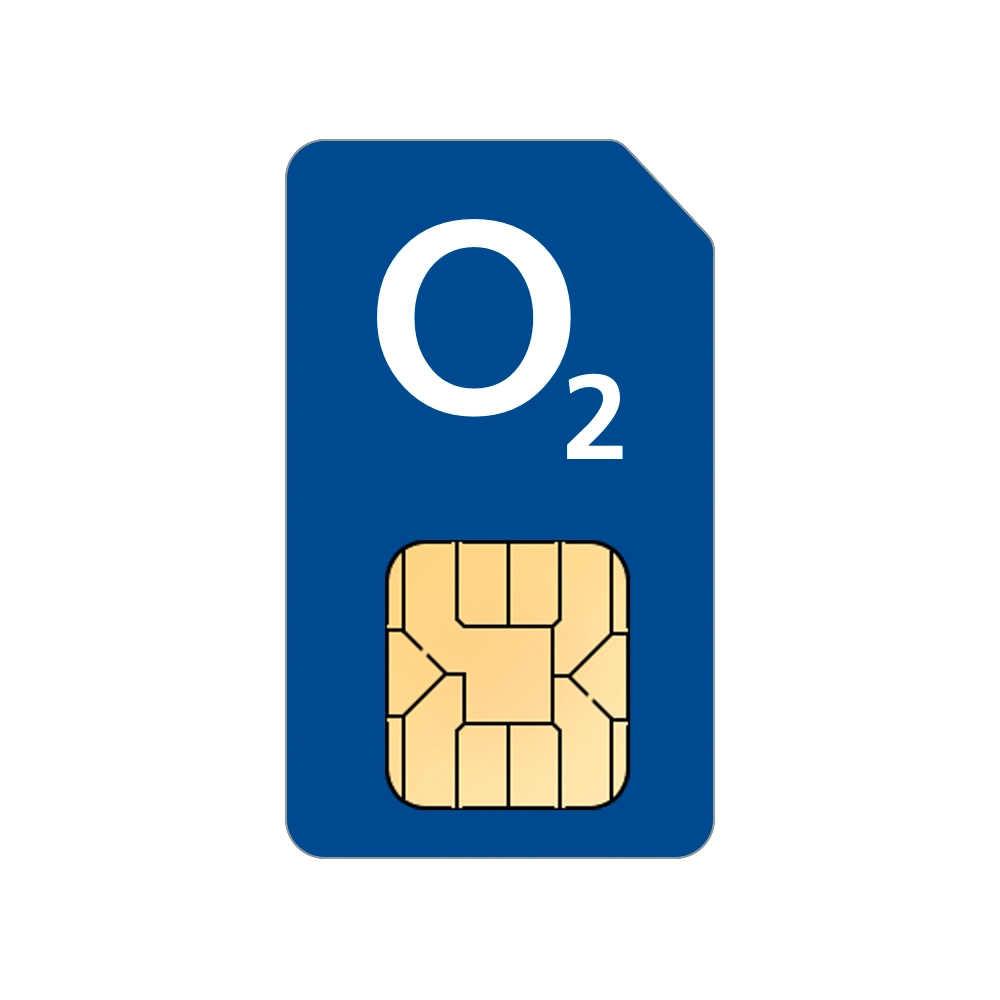
blue o2 sim card

What is a business SIM-only plan?

A SIM-only plan is one of the most popular with the crowd that already has a handset to hand. It does what it says on the tin – no mobile and just a SIM. There’s some benefits and a couple of drawbacks but these can differ depending on your situation so take the drawbacks with a pinch of salt.

Benefits

  • Much cheaper monthly costs.
  • Flexible contracts: monthly rolling or 12-months.
  • Easier to scale as your team changes.

Drawbacks

  • Upfront costs if you need to add new devices to your plan.
  • No bundle discounts as you’re only needing a SIM-only contract.
apple iphone 15

What is a business handset contract?

A business handset contract is a plan that bundles both the handset and SIM. There may be an upfront cost and you’ll be signed up for, most commonly, 24 or 36 months. Again, there’s benefits and drawbacks to this too. It’s all about balancing your mobile plan to get exactly what you require.

Benefits

  • All-in-one convenience: billing, devices and contract support.
  • Spreads out the cost over the contract length, so less to pay upfront.
  • You get to use the latest smartphones.
  • Easier for IT to manage since the handset will have up-to-date security updates.

Drawbacks

  • Higher total costs paid over the contract length due to interest.
  • Locked into the contract length or high costs to cancel.
  • Early upgrades can mean extra costs.

Key factors to consider

In all honesty, it’s completely up to you what you decide to go with but before you sign anything, there’s some bits and pieces to consider.

Hardware funding

Do you have cash set aside to pay for the devices outright? SIM-only can save you a lot of money if you buy a handset, especially month-to-month. If not, monthly payments are likely right for you, so you can spread costs out.

Expansion and scalability

Are you experiencing rapid growth or are you expecting to be? SIM-only plans are great for flexibility, letting you add or remove numbers quickly. Handset contracts are less agile and may produce some penalties if you want to cancel before the end of the term.

Upgrades and technology

Do you need the top-of-the-range handset? By choosing a handset contract, you have the option to upgrade early. If you or your team primarily uses calls, texts and basic apps, a SIM-only plan might be best.

Make your mobile plan work for you

In the end, SIM-only and handset contracts both have their perks – it’s just up to you to figure out which best fits you. The right fit depends on your cash flow, pace of expansion and basically, how much you’re happy to spend. If you need a hand, we’re always happy to help – just get in touch!


FAQs

Yes, because a SIM-only plan gives you minutes, texts and data for your existing device, your monthly bills will be much lower.

Yes – they’re easy to adjust up or down, so you can quickly add or remove SIMs without penalty.

Handset contracts give you a new phone and mobile plan in one bill, making device management and upgrades simple.

Yes, SIM-only plans work perfectly for BYOD (Bring your own device) policies—just give your team a business SIM for use in their own phones.

Small businesses benefit from SIM-only deals, medium businesses often choose a mix, and large enterprises usually prefer handset contracts for easy management.

The battle of Samsung vs Apple has been around as long as smartphones themselves. People have been discussing which is best, but who really knows –after all, it’s really about preference. As a telecoms business, we must stay neutral, don’t we…

When it comes to your workplace, you must be wondering which is best for you and your employees, but we’re here to help. Let’s break down the benefits of each, their positive points and what features you really could make the most of.

Apple: ‘The Seamless Operator’

We coined this nickname because it fits perfectly. Apple holds a large portion of the handset market, but with their tech, we’re not surprised. You might be wondering why – let’s dive in.

Effortless ecosystem integration

One of the biggest selling points for Apple is its ecosystem. If your team already uses MacBooks or iPads, adding iPhones to your mix is a no-brainer. It allows for everyone to seamlessly connect and share assets, files and messages using AirDrop across multiple platforms without needing additional software.

Gold-standard security

Security is at the forefront of your mind all the time. Apple controls both hardware and software, which means iPhones are notoriously difficult to breach. Regular updates keep the device up-to-date with new features. At the same time, they also improve security, ensuring your device stays protected. Combined with FaceID and TouchID, you should be good to go.

Samsung: ‘The Productivity Powerhouse’

Again, we’ve made up the nickname, but we feel it’s just as accurate as Apple’s. Samsung isn’t just another player in the smartphone market, but another one of the largest players. The Android software is actually one of the main reasons that it wins over a large number of businesses across different sectors. It can allow for more customisation and closer collaboration between the user and your IT security teams. If you don’t have an IT team for yourself, its built in Knox system can handle security for you. More on that soon.

Desktop-level multitasking

For those who need it most, flexibility is built into most Samsung devices. Samsung Dex is their multitasking software, which promotes using your mobile in more ways than you would typically. You can connect your handset to your monitor and Bluetooth devices to use it as a fully functional worktop, expanding your screen size to your desktop monitor. Talk about an easier screen size to carry out those pesky spreadsheets.

Fort ‘Knox’ security

If you’re not fully in tune with technology security, it may not be at the forefront of your thoughts, but Samsung may have you surprised. Their Samsung Knox security measures create a strong barrier between your business and potential threats. This software is trusted by millions from consumer to business backgrounds and even government businesses. Hopefully, that should give you some confidence in the software which runs silently as you go through your day. Samsung themselves have even put together a page on their website which states “Samsung Knox has successfully met the rigorous security requirements set by Governments and major enterprises around the world.Read more about their government-grade tech here.

The comparison between Samsung and Apple

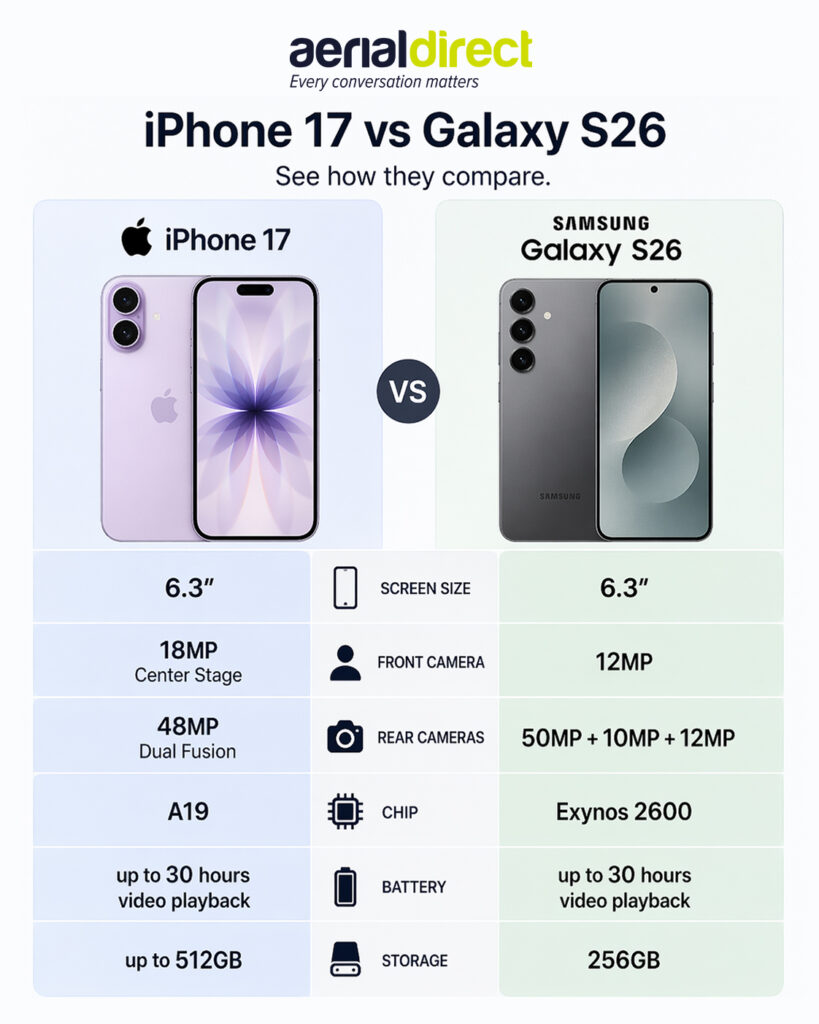
To make a valid decision between the two brands, you’re going to need an easy side by side comparison. It’s easy to chat about their benefits, but it’s how the handset will sit within your current tech ecosystem which will likely be the deciding factor. Let’s pop them next to each other in bullet-point form to make it as clear as possible.

The latest iPhone lineup

Apple’s newest lineup, the iPhone 17 series, features impressive screen quality, high resolution cameras and the A19 chip. It really can cover all bases.

The highlights

  • ProMotion display: It’s highly durable and high-quality display ensures for longer use and less heartbreak if it slips from your hands.
  • A19 chip: It can handle pretty much everything you can throw at it from a processing and multi-tasking perspective.
  • Long battery life: You’ll no longer need to worry about finding a charging point whilst on the move.
  • 48MP camera: Working on site? Capture the work in high quality to record in your files or send to the client.

The latest Samsung lineup

With the latest Samsung Galaxy S26 being the newest release in the lineup, it shows just how much effort is going into the range to create the ultimate smartphone, especially for business.

The highlights

  • Ambient camera island: Capture your project in high quality.
  • Improved performance: Samsung has boosted its processing power so much that you’re looking at sizeable increases in performance.
  • Advanced cooling: Using thermal technology, the Galaxy S26 features a redesigned Vapor Chamber, which has been created to reduce potential overheating.
  • Fast charging: Be on the road even quicker with fast wired charging, which can get you up to 69% in just 30 minutes. That kind of fast charging can make a huge difference, especially for business users who are constantly on the go.

It doesn’t always need to be the newest release…

We’ve spoken about the newest handsets offered from both top layers in the mobile market but it’s not always about the biggest and the best. You can find some wonderful options in slightly older models.

It’s possible to choose older handsets and still benefit from incredible handsets at a great price. After reviewing extensive sales data from 2025, we found that a number of our best-selling mobiles are from older ranges, such as the iPhone 13, iPhone 15 and Samsung Galaxy A16. Take a look for yourself and find the perfect mobile to fit your requirements.


You use your mobile every day. Your keys and your phone, it’s one of those everyday essentials that stays with you, following you around everywhere you go. You might be wondering what the point of getting a business mobile might be? We can assure you, it’s necessary. Working in the industry, we hear it all the time how it helps countless business streamline their communications.

Using your personal mobile might sound like the logical option but it can cause some crossover problems. A business mobile can be the answer whilst not breaking the bank. It’s actually cheaper than you might think and it’s well worth having one. Let’s get into it in more detail.

The true value of a dedicated handset

A business mobile allows for a dedicated point of call throughout your working week that you can rely on. You can choose the type of handset and network provider you prefer, then get started with setting it up.

Your new mobile should be the answer to flexible working and taking phone calls on the road without impacting your personal mobile phone usage. It all sounds well and good using your personal phone for work but creating that separation stops the blur between work and personal communication.

The amount you spend on your business mobile can be completely up to you. There are new mobiles and older models which will work perfectly for work. Our team puts a lot of effort getting our customers the best deals possible so if you’re looking for your next mobile, request a quote and we’ll be in touch.

Streamlining communications

A streamlined business mobile structure can keep everything under one roof. Instead of juggling personal phone numbers, WhatsApp accounts and work information, everyone gets a clear and professional line. Mixing personal and work can lead to confusion or blurred boundaries, which is best avoided.

multiple people holding business mobiles

Centralised contracts

It’s not just about keeping tabs on employees and what they’re using their mobiles for, it’s also to smoothen out the process of handing out numbers to customers or clients. If you can quickly check a directory for an employee’s contact information, you can give it out in a speedy fashion. It’ll look nice and professional.

Centralising the whole system to business-managed numbers takes out any headaches and keeps it all in one trackable place. If an employee leaves your business, for example, you can retain the number and assign it to someone else. That would also be the case for a business mobile, making the handover a lot more efficient. You’ll never have to worry about a client or customer calling an ex-employee’s personal phone ever again.

Better team collaboration

When everyone uses the same mobile network, it’s easier to share information and stay connected as a team. You’ll be able to setup shared data pools and quickly access cloud-based documents with ease. There are a few more areas you can benefit from too. Take a look:

2 people smiling in an office looking at a mobile phone
  • A business number helps build trust and keeps every customer interaction professional.
  • Quickly release company-wide mobile updates at the same time.
  • Ensure all devices have the same communication apps installed, like Teams or Slack.
  • Monitor and keep up to date with device security.
  • Monitor individual handset use and make sure nobody runs out of data.

Building trust with clients

Gaining trust with prospects comes in many shapes and sizes. From the very first contact, you want to start off on a professional note so the client knows what to expect. Having a business mobile allows for that mark to be set. It’ll also input a security level, making sure the ‘hello’ you give a client or customer is appropriate, instead of the casual greeting you’d give your friends.

As you’d expect, it’s widely known that people are going to feel more comfortable when presented with a professional introduction. You’re in charge of your destiny and make them remember you for the right reasons.

Improved efficiency

Business mobiles are essential tools for getting work done efficiently. Getting a business mobile setup the way you need, with all the right apps, access and tools mean you can storm ahead with your work without having issues. Especially if you’re in front of a customer.

Working from anywhere

A business mobile can you a new level of flexibility as long as you have the correct setup. You can work on the train, whilst waiting for a flight or even just working out of a coffee shop for a change of scenery.  

The right apps and tools

With a managed business handset, you’ll be able to pre-load the required tools you’ll need to succeed.

Project Management

Monday.com

Asana

Trello

Communication

Microsoft Teams

Outlook

Slack

CRM

Salesforce

HubSpot

By having these on a business mobile, it helps you focus on work tasks since everything’s organised in one place, keeping it strictly professional.

Cost management

Nobody likes dealing with expense forms. If your team is using their personal mobiles for work purposes, they’re going to want to be reimbursed for their data, calls and texts. Having a central business mobile infrastructure cuts that out, making your life easier. The expenses for the mobiles will go straight through, the same as any other business expense – no additional paperwork required.

Predictable monthly outgoings

Knowing what’s going out and coming into your bank account makes planning for the future much easier. By signing up to a business mobile contract, handset or SIM-only (or both), the figures will rarely differ, unless you’ve gone over your data allowance.

Planning becomes much easier and if your network provider will allow it, which in most cases it’ll be fine, you can scale your plan. It’s worth checking before you sign up. Add additional handsets or SIM cards to grow along with your business.

Enhanced security and data protection

It’s almost impossible to speak about business devices without the conversation of security. The main obvious issue with using a personal mobile device is having confidential business information on an unregulated handset. Messages can get mixed, photos can get muddled and apps can be all jumbled.

With a business mobile, you can regulate all of this and can truly take control. In the worst case, if a mobile were to be lost or damaged beyond repair, data won’t be lost and you’ll be able to carry on with business as usual.

  • Enforce strong password requirements
  • Remotely wipe data from the device
  • Block the download of unwanted apps
  • Ensure all devices are running the latest security updates

After all, it’s not just your data and information but your customer’s and client’s. Under the GDPR requirements, you’re responsible for the security of data. Don’t let this skip your mind and protect yourself from costly data breaches.

Ready to make the switch?

Knowing when to switch is important as you don’t want to get caught out paying premium prices for personal plans. A business mobile gives you the professional edge, secures your data, keeps your team happy and makes your life, or your accountant’s life, much easier.

Level up your business mobiles and get started today by comparing business mobile tariffs and discovering just how much time, money, and stress you could save yourself.

FAQs

A business mobile can help streamline your communications. It can assist separating work and personal usage and enhances professionalism. It can also offer cost-effective solutions and ensure better security for business data.

A dedicated handset provides a reliable point of contact and prevents a blur between personal and work communications. It also opens the door to flexible working.

A business mobile enables centralised contacts, shared data pools and consistent communication tools like Microsoft Teams or Slack. They also ensure for smooth roll outs of monitoring software and security updates.

Business mobiles eliminate the need for individual reimbursements. Predictable monthly costs and scalable plans can make planning for the financial year a lot easier.

Having your sensitive data behind a protection barrier is important and enforcing strong passwords and FaceID can do just that. You’re also able to remote wipe data off devices, restrict app downloads and roll out regular security updates.

Your business mobile is more than just a device; it’s the key to your business whilst on the road. It’s basically a laptop in your pocket that can take calls, plan your next meeting, talk to customers and have access to your emails. Getting your mobile strategy right is essential these days. Miss the mark and you could be out of pocket, paying too much and being inefficient – which nobody likes.

This guide is purposefully built to help you navigate the world of business mobiles including the ‘need-to-knows’, how to setup your mobile, exploring the market for offers and keeping track of your arsenal. Whether you’re a small business with just one mobile, or you’re a medium to large business that has many, we should be able to give you a hand and take some of that load off. Let’s get started. Want to skip to a particular section? Use the handy navigation below.

Navigation

  1. Why get a business mobile?
  2. Samsung vs Apple: Which is better for business?
  3. The difference between network providers
  4. Best apps for your business mobiles
  5. How to upgrade your business mobiles
  6. SIM-only or handset: Which is better for business?
  7. How a poor business mobile plan can affect your business
  8. Top 5 business mobile myths

Why get a business mobile?

You may be wondering if a dedicated business mobile strategy is really necessary – don’t worry, we’ve heard it before. Working in the industry, we’ve helped a lot of businesses from various markets get on track to streamline their business mobiles. While using a personal mobile might be your current way of doing things, we’d like to suggest for you to consider otherwise. It’s worth getting a business mobile – we promise. It’s more than just making calls, it’s about creating a secure, professional and efficient system for you and your whole team. The benefits outweigh giving out your personal phone number.

Streamlining communications

A dedicated business mobile plan brings you and your team’s communications under one roof. Instead of juggling personal phone numbers and work contact information, everyone has a clear and professional line of communication. It’s not just easier for keeping track of your employees but when a client needs to be contacted, or has asked for a point of contact, it can be handed out with ease, centralising the whole system to business-managed numbers, taking out the headaches and keeps it all in one trackable place.

Looking professional

First impressions count. If you’re using your own mobile and mobile number, the merge of personal calls and business calls may get a bit cloudy. Whether it’s an existing customer or new, ringing in, you’re going to want to give them the professional ‘hello’ rather than the one you give your friends on a weekend. Having a business mobile for yourself and your team allows for consistency, credibility and it shows you’re an established business which takes communications seriously.

Improved efficiency

Business mobiles are tools for getting work done more efficiently. Setting up your mobile in the right way, with the correct apps, you can work from anywhere without any form of interruption. This is especially key when you’ve got an optimal SIM and data setup to boot. We’ll come on to that further down the article. The flexibility that a business mobile gives you isn’t comparable to the office-bound way of working as it can allow for travel and working remotely without requiring a full desk-phone setup.

Cost management

Nobody likes having to deal with expense claims. This could be the case if your team are using their personal mobiles – they’ll want the calls and data back that they used for business use. A business mobile’s sole purpose is to be owned and set up by the business. You can choose the handset you want, the data plan you want and the bolt-on packages you want when setting up new devices with a network provider. The predictability of setting up new devices makes planning your financials a lot easier.


Samsung vs Apple: Which is better for business?

The big debate of the 21st century: what’s better – Samsung or Apple? Samsung and Apple both have mobiles which are well-suited for being used in business, it more depends on an individual’s preference. Think to yourself: what have you used before and would you consider switching? They both have powerful features that they bring to the table so let’s break it down.

Performance comparison

When you look under the bonnet, both Samsung and Apple pack a serious punch in terms of performance. It really depends on what you’re looking for in your mobile of choice.

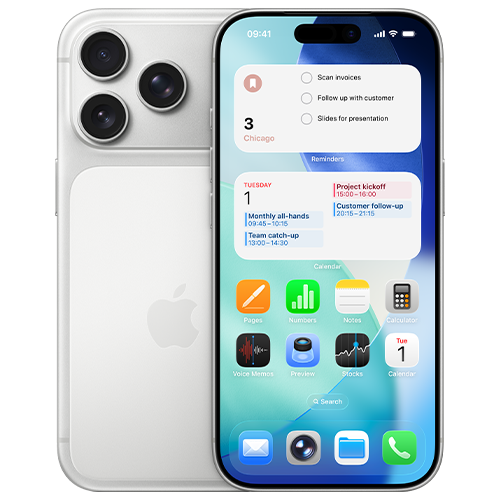
iphone 17 pro
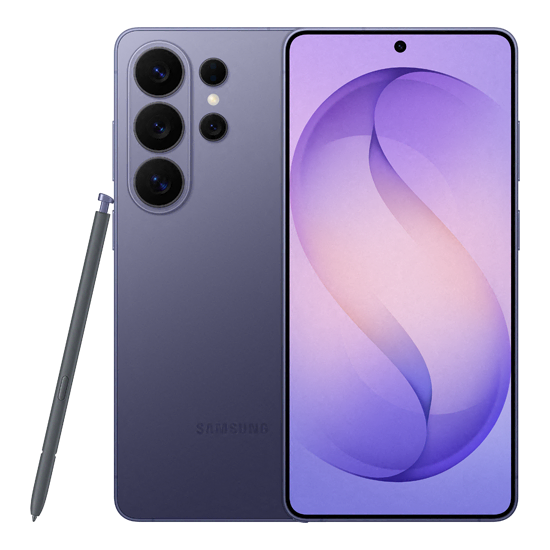
samsung galaxy s26
  • Samsung – The Samsung devices on offer have impressive processing power, either with their top-of-the-line offering named the ‘Snapdragon’ or their in-house processors named ‘Exynos’. Outside of the tech talk, they’re basically really quick and can handle more or less anything you can throw at them. Samsung also tends to offer more RAM which also contributes to the overall speed of the mobile. This is especially important if you’re wanting to carry out a larger-than-normal amount of multitasking.
  • Apple – The more recent Apple line up features their top-of-the-range A-series chips, designed in-house by Apple. This allows for seamless integration between their hardware and their iOS software, resulting in a super-smooth and responsive user experience.

In short, they both offer an impressive level of tech. Let’s have a look at their compatibility next.

Hardware and software compatibility

Compatibility can be some people’s major decider when thinking about their next business mobile.

Samsung, as it runs on Google’s Android operating system, offers more of an open ecosystem when it comes to day-to-day operations. This allows for a higher level of control and flexibility when connecting to Google workspaces and other third-party apps. It’s especially important if you rely heavily on those apps.

Apple is a bit more ‘locked down’ in comparison. More of a closed system. This means their hardware and software are tightly controlled by Apple themselves and can’t be customised in many ways. It does however mean it’s trustworthy, reliable and creates a friendly user experience across other Apple products. If your business already runs on Apple primarily, it’ll be a no brainer to go down the Apple route again. We find this when speaking to our customers – they typically prefer to stick to what they know. Just a little bit of insight for you.

Security features

Samsung has put lots of time and effort into its Knox platform. This is what is in place to protect your business mobile and the content within it. Designed to work quietly in the background, Knox is there to be a barrier to those threats you don’t want to have to deal with because we all know how annoying they can be when they show their face. The way Samsung has designed their security also means it’s easier to control what you need, going back to their open ecosystem. IT teams can fully protect and monitor mobiles with more ease.

Which brings us on to Apple. You’d think having a closed ecosystem would mean you’re not able to see and protect your business mobiles how you want but in fact, a lot of the work is done for you. Apple have built their platform to be trustworthy and protected right from when you set it to downloading various apps from their app store. The closed nature, combined with Face ID and Touch ID, protects your device right out of the box.

Value for money

Which option gives you more bang for your buck, you might be asking? Now, with the options available to you and depending on if you’re looking for a top-of-the-line model or a cost-effective option, it’s completely up to you with how much you want to spend. Both Samsung and Apple produce attractive lineups which allows for buyers to choose how much they want to spend based on the features they require.

Samsung offers a wide range of devices at various price points, from premium models to budget-friendly. This gives you full freedom to spend what you want.

Apple typically has higher price-point mobiles, but they do hold their value for an exceptional amount of time. This resale value and their overall longevity can mean you have a decent value mobile to trade in when it’s upgrade time.


The difference between network providers

Deciding on the handset you want is just one piece to the puzzle. The next and arguably more important piece is choosing a network provider as it decides how you’ll actually operate. From an aerial view, it might seem like all networks offer basically the same, however, that’s not the case and you’ll find that out quite quickly when having a look for yourself. Saying that, you’re probably wondering what you should be looking out for when browsing networks?

Coverage and reliability

Think of network coverage as the foundation of your business mobile plan. What happens when your team can’t get a stable connection? You’ll find out quite quickly, that’s for sure. There will likely be troubled employees and annoyed customers as far as the eye can see. We hate to say it but that’ll transfer into loss of revenue if that’s the case and nobody wants a problem like that!

Luckily, different network providers have varying strengths around the country. Some might be better than others where you are. It’s always worth checking before you start seriously looking as it could quickly cut some off your list if they’re not too reliable in your area. Luckily, Ofcom have a mobile signal checker which you can find on their website.

Data speeds

Nobody would want slow data speeds. As of recent, many providers have taken to offering 4G and 5G as standard. Network providers have even been working on turning off 3G as it didn’t offer much in the way of speed or reliability. You’ll find when exploring the market, 4G and 5G is the new standard so signing up to one of those data plans will give you the best chance of staying online no matter where you are.

Different available plans

We won’t hold you to knowing what you fully want from your business mobile plan, but we’ll help you figure it out. Network providers offer an overwhelmingly large number of business mobile plans in the form of handsets and SIM-only offers. It’s completely up to you what you choose. It’s fair to say, they’re not always built the same, especially when comparing a personal plan to a business plan. Business-specific tariffs often come with more perks such as data sharing across devices, international roaming, device insurance and sometimes dedicated account management, which is usually reserved for the larger accounts.

Plan expansion and other additional costs

All business owners hope for expansion and the last thing you’d want to worry about is not having enough business mobiles or SIM-only plans when that time comes. As you hire new members, you’ll need your plan to grow with you. It’s worth looking for a network provider that can assist with your expansion and can offer benefits such as flexible plans, clear pricing structures, caps on out-of-bundle spending.


Best apps for your business mobiles

Clogging up your home screen on your phone is one of the most annoying things to sort out. Have you ever stopped to think which apps are required and which you can safely delete? Choosing the right apps can completely transform your way of working and streamline the workload, especially if you’re matching the apps used with your team – seamless transfers and daily operations without the hassle.

Cost comparison

Some apps are free (those are our favourites) and some are paid for which have subscriptions ticking away in the background. It’s incredibly easy to lose track of monthly app costs. When selecting apps which you’ll use on your business mobile, it’s recommended to really put some thought into their cost and whether there’s a way to consolidate multiple apps to save on subscription costs.

  • Licensing: Do you need to get an expensive enterprise plan, or will a basic plan do the job? Only get what you need.
  • Consolidation: Do you need multiple apps to do the same job? Find an app which can do it all in one.

No matter your outcome, make sure to take note of the subscription outgoings and review them every once in a while, to ensure they’re still needed. If not, it’s worth looking at cancelling them.

iphone 17 pro

Flexibility

Flexibility is key. This is the case with the apps you use too. Does your current app lineup let your team work smoothly from anywhere; on a train, in a coffee shop or whilst they’re at home? By choosing reliable, cloud-based applications, you and your team can access whatever they need with ease and experience no interruptions. It makes collaborations much easier.

Scalability

As we’ve touched on before, businesses scale and the technology used needs to scale at the same pace. The apps that you use, it’s worth noting whether you can upgrade the access to them smoothly. Just a few clicks would be ideal. There are also apps which allow you to change your access on the fly, meaning when your requirements increase, you can pop into the app and upgrade your plan at the touch of a button. We recommend thinking of these things now so it cuts out the headache you could face down the line.


How to upgrade your business mobiles

It might feel like a complicated or long-winded task to switch your mobile provider and upgrade your business mobiles, maybe even a bit overwhelming, but we’re here to handle that stress for you. It doesn’t have to give you a headache. With some strategic planning, and some assistance from us, you can easily transition your team to newer mobiles or improved data plans without any additional stress.

Why upgrade?

Are your current business mobiles struggling with holding charge or perhaps they’re feeling quite slow. It happens. Old tech can be frustrating, as we all know. When that happens, it’s probably the best time to start upgrading your hardware. By upgrading your tech, it provides the best chance for yourself and your team to maximise efficiency and not have to pointlessly worry whether the mobile can keep up. The secondary benefit of a new mobile can also mean sharper cameras, longer battery life and important security improvements such as touch ID or face ID.

Timing of the upgrade

The timing of the upgrade can be just as important as the upgrade itself as if you don’t time it correctly, you may face some issues. So, when is best to make the switch to a newer piece if kit?

  • End of contract: Keep an eye on when your contract comes to a close as you could be up for an upgrade anyway.
  • End of financial year: If you’re nearing the end of your financial year, you may have some additional budget to use before it’s too late.

Device performance issues: If there’s constant talk of slow mobiles or hardware issues, it’s worth getting that sorted ASAP.

Choosing the right plan

There may seem like a massive number of plans which you could go for but it’s always worth evaluating your current usage to make sure you don’t get unnecessary data as that’ll waste money. It’s all about choosing the right plan to match your use. If your team work remotely and uses cloud apps, you’ll have to make sure you cater for their data needs. Office staff won’t need nearly as much as they can rely more on Wi-Fi so you can save some pennies on small packages. Different network providers offer different plans at different price points so browse around. It’s the best way to find a good deal.

Data transfer and setups

That last thing you’d want is to juggle the move of contacts, emails and other important files to another handset. Luckily, mobile manufacturers have made it much easier to do so, without the stress. Cloud backups mean you’re able to sign in to another mobile and restore a backup. It also gives you a chance to have a start fresh with your apps. Only download what you need when you need it as it’ll give you the best chance to keep your mobile in tip-top shape for longer as it’ll have more storage and generally less to deal with on start-up.


SIM-Only or handset: Which is better for business?

So, you’re ready for a new business mobile plan but which direction do you take? Do you go down the route of going for a shiny new handset or do you opt for SIM-only? Going for the first option, a full handset ‘all-in’ option, can feel like the easiest but is it what you really need? Could going for a SIM-only option could be the answer to your prayers? Let’s have a look in a bit more detail.

Cost comparison

To put is as simply as we possibly can, a handset contract is going to set you back more and sign you up for, typically, a longer amount of time. That’s the obvious bit. It’s basically signing up to pay off the mobile as well as a SIM to go with it. It’s not to say network providers don’t throw out some good deals though, meaning it’s not too impactful on your outgoings each month. The second obvious point is a SIM-only contract is going to be cheaper. You’re paying for the minutes, texts and data each month on either a rolling basis or a fixed-term contract. This again depends on what you sign up for. Explore your options before making your decision.

Flexibility

Signing up to a handset means you’ve signed up to a longer period of time which you will need to honour. It’s not that much of an issue, with newer devices especially, as the handset lifespan will far outstretch the term you’ve agreed to. Leaning more on flexibility, a SIM-only option may be better for you but you’re going to need a handset to start with. It could be a second hand and cheaper mobile or just an existing mobile you’ve got already, either is fine as long as you’re happy.

Device ownership

If you’re new to the business mobile game, you might not be fully educated yet, but we’ll give you a hand. With a business mobile contract, the provider technically owns the device until you’ve paid off your contract. If you’ve gone for a SIM-only contract, you’re good to go and you don’t have to worry about device ownership. That phone is yours and always will be.

Scalability

Having your business scale is a blessing. We’re incredibly proud that you’re considering the need to look into scaling your business but there is also the admin side which may get some yawns and eyerolls but, it’s not all bad. It’s much easier to upscale a SIM-only contract and add more to your plan, as long as you’ve looked into this with your provider. If you’re yet to sign up to anyone, there’s our tip of the day – check you’re able to make amends with your contract. Upscaling when having handset contracts are possible but it’ll take a bit more work. The network provider you choose can give you a hand with the details.


How a poor business mobile plan can affect your business

Signing up to a business mobile plan, handset or SIM-only, can sound like an easy task but if you get it wrong, it could give you the biggest of headaches. Bigger than any headaches we’ve mentioned before. Let’s take a look at how it can affect you if issues arise from your business mobile contract.

Skyrocketing costs

Without you knowing, a wrong plan can eat right into your profits. Sounds horrible, doesn’t it? A poorly structured mobile plan can produce some problems in terms of skyrocketing costs. Out-of-bundle plans and spending due to going over your data allowance can add up just as quickly as saying, “get me a new business mobile plan!”.

Roaming charges when travelling are also one to keep an eye on. Steep penalties can show their face when you least expect it so be careful and keep an eye on your monthly bills if you’re travelling.

A lack of flexibility

We hope just as much as you that your business expands, meaning you’ll be hiring more people and will also likely need more business mobiles for those staff. If the plan you setup is quite rigid, you’re looking at either spending lots or having issues with efficiency due to specific staff not being able to have their own mobile. When signing up to a business mobile plan, ensure flexibility and changes on the go are an option.

Roadblocks to expansion

Leading on from our flexibility point, it’s also worth checking out if the provider you’re looking to switch to has a good track record with other customers. Give Trustpilot and Google Reviews a quick scan to make sure they won’t cause roadblocks when you need changes made to your plan. If you’re experiencing any of the below, it may be worth evaluating who is looking after your mobile contracts.

  • Long wait times for SIM cards to arrive and activate
  • Slow pick up times when calling into customer service
  • Inability to pool data across plan members

Lost productivity

Poor coverage and painfully slow data speeds do more than just annoy your staff; it’ll directly impact your business efficiency and start to impact customers in the worst of times. Nobody likes bad reviews, do they. If your team can’t rely on the hardware they’ve been given, productivity will be sure to take a hit. Joining client calls, video calls and accessing important documents through cloud services will be problematic which means you could quite easily lose out on future opportunities.


Top 5 business mobile myths

When it comes to setting up yourself and your team with business mobiles, there can be quite a few misconceptions about the subject. We wanted to help clear that up and let you know of the main myths we’ve heard about in the business mobile world.

1. Business mobiles are too expensive

Is the price of business mobile contracts the part that’s putting you off? It’s actually a common misconception that dedicated work phones will cost you an arm and a leg. In reality, relying on personal devices often leads to unpredictable expense claims. In the long run, you’ll save money through options such as predictable billing, shared data pools and tax benefits.

2. Personal phones are fine for business use

The line between personal and business phones can blur if you’re not careful. It might make sense on paper to have one phone to do it all, but it can look unprofessional and may cause problems. If you’re getting a call you’re not expecting and unsure what tone to answer it in, you may be saying goodbye to a possible client if you’re not careful. There are also the IT logistics from a legal and security perspective. Personal mobiles will be harder to regulate and monitor and since they’ll be carried around everywhere, confidential files, emails and messages are on the move 24/7.

3. All networks offer the same

Thinking all networks offer the same options may seem like a sound thought but there’s actually a lot of difference from one to the next. Different networks have different offers so it’s worth the time and money to explore all the options you have available. Data also reacts differently with each network provider so check the coverage.

4. Business mobiles don’t need additional security

Everyone with a smartphone uses the lock code feature to keep your private files, photos and all sorts of other content safe. You might think this would be enough, but you’ll want to look into further encryption software and setting up separate work profiles on the software you use. You’ll thank yourself if the worst were to happen. IT personnel and external IT companies can keep a closer eye on mobiles with additional software installed which will help if the mobile goes missing. For example, you lose your phone. Not sure what to do? Get IT to lock down the phone remotely and wipe anything which is too precious to leave on there.

5. Upgrading business mobiles is a hassle

Are you dreading needing to sort out your business mobiles which you currently have? From a bird’s eye view, it may seem like a mammoth of a task but it’s not that bad, we promise. Mobiles now have efficient cloud-based accounts (iCloud of Google Drives) meaning moving over data isn’t much of an issue anymore. Are you more worried about the logistics? That again isn’t much to worry about these days. Network providers can do most of the leg work for you so really, all you need to worry about is finding your next mobile or SIM-only plan, organising it with the network provider and backing up your existing mobiles.


Time to level up

Your business mobiles play a larger part in businesses than they may present so make sure you’re setup and ready to operate at an efficient level. By choosing the right handset, you can be a real powerhouse. Are you ready to level up your business mobiles? We can give you a hand. Get in touch today.


Upgrading your business mobiles can feel like a big job. One of those admin tasks you’ve been putting off. When you’ve got some free time next, it’s worth reviewing your business mobiles as they currently stand and see if how they’re set up is the most efficient. We suggest having a cup of tea or coffee to help you – it makes it much easier!

We’ll give you a hand, showing you how to amend your current situation – even a short version if you’re in more of a rush.

In a rush? Take a look at our cheat sheet

Click each step number to view the full section.

Step 1
Check your current setup
Step 2
Figure out what you need
Step 3
Do your research

Step 4
Plan to switch

Review what you’ve got and the usage your SIM and mobile are getting.Look at what you actually need and your regular data usage.Search around and see what contracts and options are on the market.Found what you want? Do mobile backups and plan when’s best to switch to your new SIM and mobile.

Step 1: Check your current setup

Getting a new mobile can feel pretty exciting (like getting a present on Christmas), but it’s smart to do your research into which mobile to get. There are a few different types which you can consider, but the first step is to ask yourself a few different questions.

Are your contracts up for renewal?

Knowing when your contract is up for renewal is one of the most important steps, as it can be the difference between a normal renewal and having to pay a large fee for changing your contract early – called a termination fee. If it’s coming up soon, you’re good to go. You can start looking at your renewal options.

What’s working and what isn’t?

Get some real-world feedback on your current devices. If you use one yourself, then you’ll know how you get on with it and what could change for the better. If you’ve got a team that uses them, ask them some key questions to find out how they’re finding the current mobiles.

  • Is the battery lasting for the full day?
  • Is there enough storage on the device?
  • Is the mobile fast enough to keep up with normal use?
  • How is the call quality?
  • Do you have enough data for standard usage?

Finding out the answer to these simple questions can make your life a lot easier and the task of shopping around a lot quicker.

Step 2: Figure out what you really need

Now you know what works well, and the pain points with your current setup, you can truly focus on your next mobile lineup. It’s easy to get distracted by the latest and greatest features available on the market but it’s the mobile which perfectly fits your specific business requirements that you need to find.

The hardware itself

The key thing we can’t emphasise enough is not everyone needs a top of the line mobile. That can be the mistake which can cost you dearly. Get ones which fit the needs of those who use them.

Software and security

The next step is looking at the software and security. What software does your team typically use, as it’s best to make sure your current and new software are compatible with each other. If you’re working across Apple and Google, it is possible for it to work seamlessly; you’ll just need to go down the Google route. Within their tech ecosystem, there are shared calendars and Google Drive to keep you connected.

Security is another big one. Modern smartphones come with security features like biometrics (face scan and fingerprint scanning) and encryption. These are the main ways to secure your device and it’s worth getting those set up ASAP. It’s better to be safe than sorry.

Step 3: Do your research and compare deals

Now’s the time to do a bit of window shopping. With your prior research complete, you can have that at your side whilst you explore your options. It might sound easier to stick with your current provider, but it’s worth looking into other options. There could be new customer discounts or a generally better deal. Searching around can really pay off!

Compare networks and plans

The price might pull you in, but you should check the other factors  – data, calls and texts, coverage and aftercare.

  • Data: Get the right amount. Don’t overspend on wasted limits.
  • Calls and texts: Look for unlimited as that’s the standard nowadays.
  • Network coverage: Ensure you get a good connection where you need.
  • Aftercare: It’s always good to be looked after when you need it.

Look at different ways to buy

While 24 or 36-month handset contracts that combine handset and SIM are common, there are other ways to sign up for a new contract. Some of which save you money in the long run if you’re willing to go down those routes.

  • SIM-only: If you’ve got a handset already, go for a SIM-only. You don’t always need a flashy new handset.
  • Leasing: Some providers offer leasing, where the upfront costs are lower and sometimes include maintenance and support.
  • Buying outright: Like SIM-only, you can get a SIM-only contract and buy a new mobile outright. It’ll be a lump sum at the start, but if you’re able, it’s always nicer to see lower SIM-only monthly costs coming out.

Step 4: Plan for a smooth switch

You’ve made your decision, now it’s time to ensure for a smooth transition. A little bit of planning can go a long way – you don’t want extended downtime or any disruption to your business!

Schedule the rollout

Choose a time which best works for you when a switch shouldn’t cause too many interruptions. Typically, a Friday afternoon may be a good one for you. It also gives your team a couple of days to get used to the device before you get started on Monday morning.

Back-up everything

It’s worth making sure you do backups anyway but it’s especially important if you’re switching handsets. Back up all your bits on the old devices ready to move to the new one. Most phones run on the cloud but anything local, back it up so you don’t lose it.

Set up the new phones

Before the new handsets are handed out to staff, or before you start using one yourself, get it business-ready. Install the necessary security software your business may use, business apps and email accounts. This can save time when putting it in to use and thanks to manufacturers, the setups shouldn’t take too long. Just a simple step-by-step process which shouldn’t take longer than a few minutes.

You should be all setup and ready to go. By taking it one step at a time and working through our guide, the process should seem less daunting. Equip your team with the needed tools to do a smashing job. If you’re looking for some additional assistance or you want a new SIM or handset, we’re happy to help. Our Aerial Refresh team have helped thousands of businesses get what they need.

FAQs

Check when your contracts are ending and ask your team how the current features operate, such as battery life, storage and speed. It could produce some clear indications that an upgrade may be due.

It makes more sense to match the phone to a person’s role. Most may not need advanced features, so a cheaper option would make more sense.

Make sure the plan includes enough data for your usage and always make sure to check network coverage maps to ensure you have strong connection when you need it. Ofcom have a nifty mobile coverage checker on their website.

No, you can choose from a few options when upgrading, such as SIM-only deals, leasing or buying phones outright. This gives you flexibility to get what you need when it’s time to upgrade.

Plan the switch for a quieter time and make sure all devices are backed up. It makes the transition period a lot easier and smoother.

“There’s so many new mobiles on the market – where do I even start?” We hear this a lot, so you’re not alone if you feel this way. It can almost seem a little overwhelming with the number of mobiles that may seem like a viable option, but what’s really the difference between them?

We’ll outline the newest mobiles in 2026 and what you should look out for as their main sales piece – what’s really different between them and what you can benefit from during normal day-to-day life.

Samsung’s Latest Devices

Samsung has been releasing some real powerhouses in recent years and there’s no sign of them slowing down. In 2026, the brand has delivered impressive updates to both its traditional S series and its new foldable Z series, offering something for every type of user.

Samsung Galaxy S25 Series

The Galaxy S series has always been the staple of Samsung’s mobile lineup and the offerings in 2026 are no exception. They’ve really tried to refine the user experience, making upgrades across the board, from the speed to the quality of the screen. They’re definitely the upgrades you’ll struggle to miss.

The display – The Dynamic AMOLED 2X display offers bright, clear visuals and smooth performance, making it ideal for video calls, document review, and multitasking on the go.

The processor – Under the hood, you’ll find the ‘Snapdragon’ processor. This powerhouse provides a seamless experience with enhanced performance and efficiency no matter what you’re doing on your device.

Samsung Galaxy Z Fold7 and Z Flip7

Whatever your view is on the Fold and Flip phones of this generation, Samsung showcase their Z Fold7 and Z Flip7 at the forefront of their lineup. You must admit, they’re quite incredible pieces of tech.

They’re made with efficiency and multitasking in mind. The Galaxy Z Fold7 is designed to help you handle multiple tasks. When closed, it behaves like a regular smartphone. When opened, it becomes a larger, more powerful workspace for productivity.

The mobile turns into a tablet to allow for maximum room so you’re able to browse and message at the same time. Optimal if you’re looking to do some research on the side whilst taking your next big important business call.

On the slightly smaller side, the Z Flip7 is all about style and portability. Flipping down into a neatly designed square, it can tidily slip into your pocket, laptop case or rucksack, depending on your choice of carry case. If even features a screen whilst staying flipped shut, allowing you to check notifications, change music or reply to messages without the need to unfold.

Apple’s Latest Devices

Apple continues to set a high bar for design, performance and user experience. This year’s iPhone lineup introduces some exciting changes, including a brand-new model that shakes things up.

iPhone 17e and iPhone 17 Series

The iPhone 17 range came out in the latter part of 2025, but it’s definitely earned its place in the list of the newest mobiles in 2026. The top-of-the-line tech featured in their iPhone 17 models is pretty incredible and Apple has taken price into account. Introducing the iPhone 17e…

The iPhone 17e is the entry-level mobile within the new range, but it includes pretty much all the necessary tech you’d ever need in a smartphone (minus the impressive cameras) being the main hardware within the higher end of the range. The impressive A-series chip ensures a fast and fluid experience whilst keeping its sleek design.  

The standard iPhone 17 and iPhone 17 Pro and Pro Max models continue to be the primary flagships within the Apple lineup for the most recent release, as we’d expect from previous years. They feature the most advanced ProMotion displays, offering incredibly smooth scrolling and responsiveness. They can also tackle the most difficult experiences with ease thanks to their highly intelligent A-series Pro chip, the A19, exclusively in the iPhone 17 Pro. Whether you need a top-of-the-line device or to go for a respected model a little lower down the Apple chain, it’s up to you. We’ve produced a blog in the past that helps you figure out what you need for your business – take a look!

Buying a business mobile: What you really need to know.

Some key highlights of the iPhone 17 range:

  • Advanced performance with Apple’s A19 chip.
  • A Super Retina XDR OLED display with ProMotion, up to 120Hz.
  • A 48MP Dual Fusion rear cameras.
  • All-day battery with fast charging.

They might sound complicated, but to put it bluntly, it’s incredibly impressive tech that’s incredibly fast and incredibly high-quality.

Coming Soon: iPhone 18

We’ve been in the business of mobile phones for a long time, so we can comfortably say we expect the iPhone 18 to come out in the latter part of the year, typically around September to October time. If this is the case, it’s well worth looking into what’s currently available, as that’s a little while to wait for the next generation of mobiles.

Google’s Latest Devices

Google’s Pixel phones have earned a reputation for their exceptional cameras and clean Android software experience. This year is particularly exciting, with a new budget-friendly model and the promise of a next-generation flagship on the horizon. Within that, their current range isn’t anything to pass up – the Pixel 10 range can offer everything you need in a smartphone, with the lineup starting with the Pixel 10 to the impressive Pixel 10 Pro.

Pixel 10 and Pixel 10 Pro

The Pixel 10 range holds its own very well in the newest mobiles of 2026. It features impressive security features and performance capabilities to rival the likes of Apple and Samsung. Commonly the lesser choice for some could end up being a main player in this year’s market. This is especially the case when thinking of AI. Google are putting a lot of time into AI development and security to ensure the mobiles they’re selling are top quality and safe no matter the use. Check them out. You might be surprised.

Google Pixel 10a

The Google Pixel 10a is the newest mobile in the world of Google. Released for pre-order on the 18th February 2026, it holds all the likeness of the main Pixel 10 range in a bite-sized package for a cheaper cost. Think of it as the Apple iPhone 17e against the normal iPhone 17. The Pixel 10a features some impressive photography modes, minus some of the higher-level features of the Pixel 10, such as slightly slower operating speeds and a lesser display, but don’t put it down too quickly. It can do an impressive job for its price.  

Coming Soon: Pixel 11 Series

Similar to the iPhone 18, it is highly likely the Pixel 11 series will be released this year, around summertime, based on the release times of previous years. With the amount of work being put into their mobiles, Google stands strong to be a larger player in the field, aiming for the top spots from Apple and Samsung.

Summary FAQs

Apple feature the iPhone 17e and iPhone 17 lineup, with Samsung having the S25 series and foldables and finally, Google, displaying their Pixel 10 range and the newly announced Pixel 10a.

They can, in fact, be good for business use depending on your requirements. If you’re looking for something to unfold and produce a larger screen for multitasking or for design reasons, it’s well worth exploring your options.

The iPhone 17e is a more affordable version with fewer camera features but still has a faster chip and the sleek design of the new range from Apple.

Apple and Samsung have their mobiles releasing at similar times to previous years; Apple towards the end of each year and Samsung typically mid-year. The iPhone 18 and Galaxy range will be ones to look out for. Google more recently announced the Pixel 10a that is worth checking out if you’re looking for something that’s a bit easier on your wallet.

In short, yes. The Pixel 10a will offer all the necessary capabilities as the Pixel 10 if you’re looking for something more budget-friendly.

Are you looking for your next piece of reading? Take a look at our blog on the top mobiles of 2025.